ElectronicsRanker
Menu

Review

ADATA SU800 256GB SATA SSD Review and Ranking

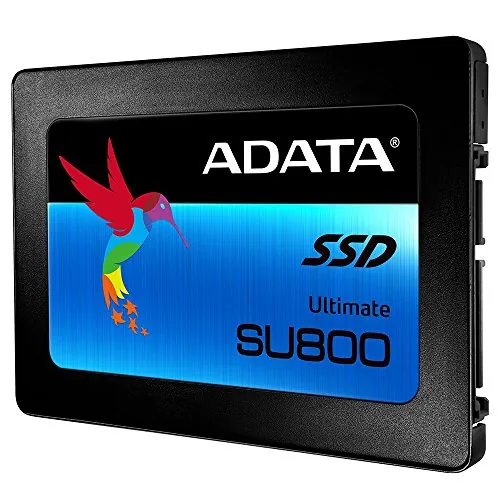
The ADATA SU800 256GB is a 2.5-inch SATA internal SSD aimed at upgrading compatible desktops and laptops. Its strongest use case is replacing an older hard drive to improve boot and application responsiveness, backed by high performance, setup, and compatibility scores. Limited 256 GB capacity and recurring reports of early failures are the key reservations.
Expert reviewed
76
Overall score
Data-driven scoring Expert reviewed Updated analysis

Why we ranked it highly

The ADATA SU800 ASU800SS-256GT-C is a 256 GB, 2.5-inch internal solid-state drive using the SATA 6 Gb/s interface. ADATA lists 3D NAND flash, a DRAM cache buffer, dynamic SLC caching, LDPC ECC, RAID Engine, Data Shaping, and Device Sleep support. Its advertised sequential speeds are up to 560 MB/s for reads and 520 MB/s for writes. This is primarily a practical upgrade for a compatible older laptop or desktop moving from a mechanical hard drive to solid-state storage, rather than a high-capacity or NVMe-class performance drive. Scores are strong for performance, speed, setup, compatibility, portability, and customer satisfaction. Review feedback frequently mentions quick boots and easy installation, but the reliability evidence is less consistent, with early-failure complaints appearing in the aggregated feedback.
90-day review Expert reviewed User feedback Data scoring

Key specs

Features & Specs

Digital Storage Capacity
256 GB
Hard Disk Interface
Solid State
Connectivity Technology
SATA
Additional Features
Portable
Hard Disk Form Factor
2.5 Inches
Compatible Devices
Desktop
Specific Uses For Product
personal, gaming, business
Read Speed
560 Megabytes Per Second
Media Speed
520
Cache Memory Installed Size
256
Data Transfer Rate
560 Megabytes Per Second
Form Factor
2.5-inch
Hardware Connectivity
SATA 6.0 Gb/s
Hardware Platform
PC; Mac;Linux

Measurements

Hard-Drive Size
256 GB
Item Weight
0.1 Pounds
Number of Items
1

Item details

Brand
ADATA
Model Number
ASU800SS-256GT-C
Hard Disk Description
Solid State Drive
Built-In Media
Quick Start Guide, SSD
Model Name
Ulitimate SU800
Manufacturer
ADATA USA
Global Trade Identification Number
04712366967250
Item Part Number
ASU800SS256GTC
Mfr Part Number
ASU800SS-256GT-C
Item Type Name
ADATA Ultimate SU800 256GB 3D NAND 2.5 Inch SATA III Internal Solid State Drive (ASU800SS-256GT-C)

User guide

Installation Type
Internal Hard Drive

Additional details

Color
Black
Enclosure Material
3D Nand Flash Memory

Scores breakdown

86 /100

Performance

82 /100

Features

84 /100

Usability

78 /100

Design

62 /100

App experience

74 /100

Display quality

74 /100

Audio quality

74 /100

Camera quality

Strengths

  • Advertised sequential read and write speeds of up to 560 MB/s and 520 MB/s.
  • Uses a 2.5-inch SATA 6 Gb/s interface that suits many desktop and laptop upgrades.
  • DRAM cache buffer and dynamic SLC caching are listed for performance support.
  • High compatibility score of 88 and stated support for PC, Mac, and Linux platforms.
  • High setup score of 88, with reviewers frequently describing installation and drive recognition as straightforward.
  • Strong customer satisfaction score of 88, supported by a 4.7/5 average from 2,856 reviews.
  • Includes a stated three-year warranty.

Limitations

  • 256 GB capacity can be restrictive for large game libraries, media projects, or extensive local file storage.
  • SATA limits peak throughput compared with NVMe-capable storage; the supplied reviews specifically note this distinction.
  • Reliability score is 68 and durability score is 61, with multiple customers reporting failures after one to six months.
  • Some buyers found access to the advertised migration software unnecessarily burdensome.
  • Desktop installation may require separately sourced mounting hardware and SATA cables, according to one review.
  • Actual speeds depend on the host system; an older SATA implementation can limit performance.

Ideal user profiles

  • Owners of older SATA-equipped laptops or desktops replacing a mechanical hard drive.
  • Users building a compact operating-system and everyday-applications drive.
  • PC, Mac, or Linux users who need a standard 2.5-inch SATA SSD.
  • Buyers who prioritize straightforward installation and strong reported boot-time improvements.
  • Users who need modest-capacity internal storage rather than a large media or game library drive.

Use cases

  • Replacing a failing 2.5-inch hard drive in an older laptop.
  • Installing an operating system and commonly used productivity software.
  • Refreshing an older desktop that supports SATA storage but not NVMe.
  • Running Linux, Windows, or a compatible Mac-based SATA storage setup.
  • Using as a boot drive alongside a larger secondary hard drive.
  • Creating a basic personal, business, or gaming PC storage upgrade.

Fit and positioning

Who this works for

Category positioning

The SU800 sits as a conventional 2.5-inch SATA SSD for systems that cannot use, or do not need, NVMe storage. Its listed 560/520 MB/s sequential rating is close to the practical ceiling of the SATA interface, while its DRAM cache buffer differentiates it from some entry-level DRAM-less designs. At 256 GB, it is best viewed as a focused boot-drive or basic-computing upgrade. The 69 value score, together with durability concerns, means it is not an automatic value choice despite the generally positive owner feedback.

Best for

This drive is best for owners of compatible older desktops and laptops seeking a simple hard-drive replacement. Its 86 performance and speed scores, 88 setup score, and 88 compatibility score fit users who want quicker system startup and application response without changing platforms. It also suits PC, Mac, and Linux users with modest storage needs, especially when the drive will hold an operating system and essential applications rather than a large archive.

Not best for

Skip this 256 GB model if you need substantial room for modern games, video editing assets, or large local media collections. Buyers with an NVMe-capable system and a priority on maximum transfer speed should compare NVMe options, as SATA is inherently limited. It is also not the lowest-risk choice for users with little tolerance for storage failure: the 61 durability score and aggregated reports of failures after one to six months warrant careful backup planning.

Performance analysis

How it performs in practice

Each scoring dimension is separated into a compact card so the strengths and tradeoffs are easier to compare without reading one long block.

Performance analysis

The SU800 earns an 86 performance score, reflecting a solid SATA SSD profile rather than premium PCIe storage performance. ADATA rates it for up to 560 MB/s reads and 520 MB/s writes and lists DRAM caching plus dynamic SLC caching to support transfers. Reviewers repeatedly describe noticeably faster booting, program opening, and general responsiveness after replacing hard drives. Performance depends on the host interface: one reviewer noted that an older motherboard limited results below the drive's headline specification. It is therefore most compelling as a hard-drive upgrade in a SATA-only system.

Feature analysis

The 82 feature score reflects a well-equipped SATA drive on paper. The supplied product information lists 3D NAND, a DRAM cache buffer, dynamic SLC caching, LDPC ECC, RAID Engine, Data Shaping, and Device Sleep. ADATA also references SSD Toolbox and Migration Utility downloads. These are useful supporting features for a basic internal drive, although the product remains a standard 256 GB SATA model without the interface bandwidth or capacity associated with more advanced storage upgrades.

Usability analysis

With an 84 usability score, the SU800 is designed around a familiar 2.5-inch SATA format that is simple to understand for routine upgrades. Reviewers commonly say the drive installed easily, was recognized quickly, and delivered an obvious speed improvement. Daily use should be uncomplicated once the operating system is installed or cloned. The main usability friction concerns migration: one purchaser found the process for accessing the free migration software inconvenient, so users should not rely on that tool without checking the current download requirements.

Design

The SU800 uses the established 2.5-inch SATA form factor, earning a 78 design score. This layout is practical for many existing laptop bays and desktop mounting locations, and its very low weight reduces physical burden in portable computers. The black drive is intended to stay inside a system rather than serve as an external portable device. Its design advantage is compatibility and straightforward replacement of older 2.5-inch drives, not visual styling or tool-free installation; mounting arrangements vary by computer.

How it compares

Within the 2.5-inch SATA SSD category, the SU800 is strongest as a responsive operating-system upgrade for existing hardware. Its advertised 560 MB/s read and 520 MB/s write speeds are consistent with the limits of SATA, and its DRAM cache buffer is a notable feature for this type of drive. Compared with higher-bandwidth NVMe storage, it cannot offer the same peak transfer rates, but it remains more relevant for older systems without an NVMe slot. Its 256 GB capacity is best for focused use, while mixed durability evidence makes it less compelling for buyers who prioritize long-term confidence above installation ease.

Ranking summary

The ADATA SU800 256GB receives an overall score of 76 because it performs strongly in the areas most relevant to a basic SATA upgrade. Performance and speed both score 86, while setup and compatibility reach 88; customer satisfaction is also 88. Its listed 560/520 MB/s sequential rating, DRAM cache buffer, and consistent reports of faster boots make it a credible replacement for a hard drive in an older compatible system. The ranking is held back by a 68 reliability score, 61 durability score, limited 256 GB capacity, and a 69 value score. It is a capable upgrade, but not the lowest-risk long-term choice.

Buying advice

Consider the SU800 256GB if your laptop or desktop has a 2.5-inch SATA bay and you need an affordable-size system drive for an operating system and core applications. Check that you have SATA data and power connections, and budget for a bracket, caddy, or cable if your system needs one. Confirm whether 256 GB will remain sufficient after the operating system, updates, and applications are installed. If you plan to clone an existing drive, review the current migration-software process first. Buyers needing larger capacity, NVMe-level throughput, or the strongest durability confidence should compare alternatives and maintain backups regardless.
76
Overall score

Final verdict

The ADATA SU800 256GB is a strong but qualified option in the SATA SSD category. Its central strength is practical upgrade performance: the rated 560/520 MB/s speeds, DRAM cache, simple 2.5-inch SATA design, and high setup and compatibility scores make it well suited to reviving an older PC or laptop. Buyer sentiment is broadly positive, especially around boot speed and ease of installation. Its main limitation is confidence over time, as the durability and reliability scores trail its performance scores and some customers report early failures. It is best for modest-capacity upgrades with a reliable backup plan.
Back to review

Key topics

ADATA SU800 256GB review, ADATA SU800 SATA SSD review, ADATA SU800 256GB ranking, ADATA SU800 ASU800SS-256GT-C, 256GB 2.5 inch SATA SSD, best SATA SSD for old laptop, ADATA SU800 comparison, SATA SSD upgrade review

Frequently asked questions

Is the ADATA SU800 256GB worth buying?
The ADATA SU800 256GB is a reasonable option for a SATA-based system when 256 GB is enough for the intended workload. It scores well for performance, compatibility, setup, and customer satisfaction, while reviews often report faster boot and application response. The main cautions are the modest capacity, SATA speed ceiling, and reports of some early failures.
Is the ADATA SU800 256GB good for upgrading an old laptop?
It appears particularly well suited to older laptops with a 2.5-inch SATA drive bay. Verified-purchase reviews describe noticeable improvements in boot times and general responsiveness after replacing hard drives. Confirm that the laptop accepts a 2.5-inch SATA drive and check whether a caddy, bracket, or cable is needed before ordering.
How fast is the ADATA SU800 256GB?
ADATA lists sequential read speeds up to 560 MB/s and write speeds up to 520 MB/s. Its speed score is 86, and reviewers commonly praise faster booting and program loading. Results will vary with the motherboard, SATA generation, operating system, workload, and remaining free capacity; older SATA hardware may not reach the listed maximum.
What are the main limitations of the ADATA SU800 256GB?
The largest practical limitation is its 256 GB capacity, which may fill quickly with games, video files, or large software collections. It is also a SATA SSD rather than an NVMe model, so its interface limits peak transfer speed. Reliability and durability scores are comparatively weak, and customer feedback includes reports of early drive failures.
Is the ADATA SU800 256GB easy to install?
Setup is one of this drive's stronger areas, with a score of 88. Several reviewers report easy physical installation and immediate recognition by Windows, while others successfully used it with Linux. However, a desktop installation can require separately purchased SATA cables or a mounting bracket, and migration-software access received mixed feedback.
Does the ADATA SU800 work with Linux, Mac, and PC systems?
The supplied specifications list PC, Mac, and Linux as compatible hardware platforms, and reviews include positive Linux Mint experiences. Compatibility ultimately depends on having an available 2.5-inch SATA connection and suitable mounting space. Operating-system migration and drive formatting requirements can differ by device, so these should be checked before installation.
Does the ADATA SU800 include migration software?
ADATA states that SSD Toolbox and Migration Utility software can be downloaded free of charge. However, one verified purchaser described the process for obtaining migration software as burdensome because proof of purchase was requested in a specific image format. Plan for the possibility of using another compatible cloning tool if the download process is inconvenient.
How reliable is the ADATA SU800 256GB?
Evidence is mixed. Many reviewers report trouble-free operation, including one longer-term update describing continued use after three years, but the aggregated review summary also notes multiple failures within one to six months. That pattern aligns with its 68 reliability score and 61 durability score, so backups remain important for any data stored on the drive.

Related Guides & Rankings

Comparisons featuring this product