ElectronicsRanker
Menu

Review

Angetube PC 1080P Webcam with Mic Review

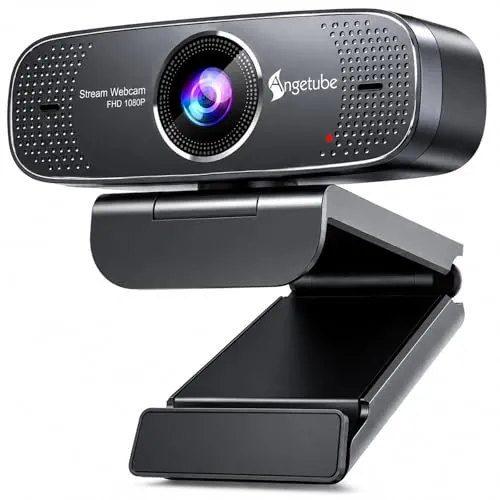
The Angetube PC 1080P Webcam with Mic is a budget USB webcam for video calls, online teaching, basic recording and entry-level streaming. Its strongest case is easy 1080p desktop or laptop use, supported by strong setup, compatibility and value scores. Manual focus, mixed reliability feedback and limited support evidence are the important compromises.
Expert reviewed
80
Overall score
Data-driven scoring Expert reviewed Updated analysis

Why we ranked it highly

The Angetube 920U is a compact USB webcam listed with 1080p video at 30 fps, a 100-degree wide-angle lens, manual focus and dual digital noise-cancelling microphones. It is positioned for video conferences, online classes, business meetings, recording and livestreaming rather than specialist content production. The score profile is strongest in setup, compatibility and value, while customer reviews commonly praise sharp video, simple installation and usable call audio. The camera also lists automatic low-light correction and a tripod thread under its base. Its main practical limitation is the manual-focus lens: it can produce a stable image once adjusted, but does not adapt automatically when the user moves. Buyers should also weigh the mixed reports on reliability, white balance and support availability.
90-day review Expert reviewed User feedback Data scoring

Key specs

Additional details

Sensor Type
CMOS
Connectivity Technology
USB
Color
Black
Features
Low Light
Water Resistance Level
Not Water Resistant
Has Image Stabilization
Yes
Image stabilization
Digital
Form Factor
Compact
Item Weight
153 Grams
Style Name
1080p
Operating System
Linux, Mac OS, Windows7/8/10/11

Lens

Maximum Focal Length
1200 Millimeters
Maximum Aperture
2 f
Minimum Focal Length
70
Lens Type
Wide Angle
Minimum Aperture
0.7 Millimeters
Focus Type
Manual Focus

Display

Screen Size
2.7 Inches
Display Resolution Maximum
FHD Pixels

Memory

Flash Memory Type
CompactFlash
Flash Memory Bus Interface Type
SATA

Audio

Supported Audio Format
AAC, MP3
Number of Speakers
2

Compatibility

Compatible Devices
Desktop/Laptop, Laptop, Macbook, Personal Computer

Item details

Brand
Angetube
Model Number
920
Camcorder Type
Webcam
Model Name
920U
Built-In Media
Webcam
Are Batteries Included
No
Manufacturer
Angetube
UPC
653854499942 601263867074
Global Trade Identification Number
00601263867074
Unit Count
1.0 Count

Image & Video

Video Resolution
1080p
Video Capture Format
MJPEG
Effective Still Resolution
2 MP
Image Capture Speed
30 fps
Shooting Modes
60FPS mode, HDR mode
Image Aspect Ratio
16:9
Supported Image Format
JPEG
File Format
H.264
Exposure Control Type
Automatic
Effective Video Resolution
1080 Pixels

Zoom

Digital Zoom
1 x
Zoom
Digital

Scores breakdown

84 /100

Performance

82 /100

Features

84 /100

Usability

78 /100

Design

65 /100

App experience

84 /100

Display quality

82 /100

Audio quality

84 /100

Camera quality

Strengths

  • Listed 1080p video capture at 30 fps, with an 84/100 camera-quality score.
  • High 90/100 setup score aligns with repeated plug-and-play praise from reviewers.
  • Broad stated Windows, macOS and Linux compatibility, supported by an 88/100 compatibility score.
  • Dual noise-cancelling microphones receive generally positive feedback for calls and teaching.
  • 100-degree wide-angle lens can suit group calls, lessons and compact workspaces.
  • Strong value profile at $32.10, reflected in an 88/100 value score.

Limitations

  • Manual focus requires adjustment and is less convenient for users who move frequently on camera.
  • Reliability and durability both score 72/100; some buyers report the webcam eventually stops working.
  • One detailed review reports yellow-tinted white balance with no clear adjustment path.
  • The 100-degree view is too wide for some desk-based calls, and feedback on the field of view is mixed.
  • Brand-trust, app-experience and warranty-support scores are comparatively low at 62, 65 and 45.
  • Optional camera software is described as requiring contact with the after-sales team, adding friction for advanced controls.

Ideal user profiles

  • Remote workers who need an affordable external webcam for video meetings.
  • Teachers and students recording online lessons or attending virtual classes.
  • Beginner streamers using OBS Studio who are comfortable setting focus manually.
  • Desktop and laptop users on supported Windows, macOS or Linux systems.
  • Buyers replacing a weak built-in laptop camera without paying for a premium model.

Use cases

  • Zoom, Skype, Teams and similar video-conferencing calls.
  • Online teaching and recorded lessons.
  • Basic 1080p recording at a desk.
  • Entry-level livestreaming with OBS Studio.
  • Small group calls using the wide-angle field of view.
  • Tripod-mounted webcam placement via the threaded base.

Fit and positioning

Who this works for

Category positioning

This is a value-focused 1080p USB webcam rather than a premium, automation-heavy model. At $32.10, it targets people upgrading from an uninspiring built-in laptop camera for meetings, classes or simple streaming. Its 80/100 overall score is driven by practical basics: plug-and-play use, stated multi-platform support and a wide field of view. Manual focus and weaker support-related scores make it less suited to buyers who prioritize polished software controls, autofocus or stronger long-term ownership confidence.

Best for

The Angetube is best for budget-conscious remote workers, students, teachers and beginner streamers who need a straightforward external USB webcam. Its 90/100 setup score and 88/100 compatibility score support this role, while reviewers often report a noticeable improvement over laptop cameras. It is especially practical when the camera distance is fixed, allowing the manual-focus lens to be set once and left in place.

Not best for

Buyers who need autofocus, consistent colour handling, a narrower framing option or dependable manufacturer support should consider other choices. Manual focus is not ideal for active presentations, and one detailed review reports a persistent yellow tint. The 72/100 reliability and durability scores, plus a 45/100 warranty-support score, also make it a less convincing choice for users who need high confidence in long-term, business-critical use.

Performance analysis

How it performs in practice

Each scoring dimension is separated into a compact card so the strengths and tradeoffs are easier to compare without reading one long block.

Performance analysis

The Angetube earns an 84/100 performance score and is listed to capture 1080p video at 30 fps. Reviewers frequently describe the image as sharp, clear and a meaningful upgrade from built-in laptop cameras, particularly for calls and lessons. Automatic low-light correction is listed, with some positive user feedback about dim-room use. Results are not entirely uniform, however: a detailed review cited poor white balance, and the manual focus requires careful positioning for the best image.

Feature analysis

The key feature set is practical for a low-cost webcam: 1080p/30 fps capture, a 100-degree wide-angle lens, manual focus, dual microphones, USB connectivity, low-light correction and a tripod mounting thread. An optional software tool is described for camera settings on supported Windows and macOS versions. The 82/100 feature score is solid, but the 68/100 smart-features score indicates this is not a feature-rich smart camera with advanced automated controls.

Usability analysis

Usability scores 84/100, supported by repeated reports of easy installation and uncomplicated daily operation. The camera appears well suited to users who simply want to connect a USB webcam and join a call. Manual focus is the central usability trade-off: it avoids focus hunting once set, according to some reviewers, but requires physical adjustment. Users seeking advanced image adjustments may need the optional software or separate third-party tools.

Design

With a 78/100 design score, the Angetube emphasizes functional desk use over elaborate styling. Its compact form and black finish should suit typical monitor or laptop setups, while the 100-degree lens is designed to include more people or room context. That wide framing is beneficial for lessons and group calls but can be excessive for individual meetings. The manual-focus control is practical for fixed setups, though less convenient than autofocus for changing positions.

How it compares

Within the 1080p USB webcam category, the Angetube competes through simple setup, broad stated platform support and low purchase cost rather than autofocus or advanced software. Its 100-degree lens and dual microphones give it useful flexibility for group calls, teaching and entry-level streaming, while the 1080p/30 fps specification covers standard conferencing needs. The manual-focus design can be an advantage in a fixed desk setup because it does not continually refocus, but it is less adaptable than autofocus. More polished alternatives may offer better control software, support assurance or reliability confidence; this model’s advantage is its accessible value proposition.

Ranking summary

The Angetube PC 1080P Webcam earns an 80/100 overall score because it performs the fundamentals well at a low price. Its strongest results are setup at 90/100, compatibility and value at 88/100, plus 84/100 scores for performance, usability and camera quality. These strengths are reinforced by a 4.4/5 rating from 2,584 reviews, where easy installation and clear video are common themes. It is held back by 72/100 reliability and durability scores, modest brand trust, a 65/100 app experience and limited warranty-support evidence. No category rank position was supplied, so this assessment focuses on its score profile rather than a numerical placement.

Buying advice

Consider the Angetube if you want an inexpensive USB webcam for a fixed workstation, online classes or routine video meetings and are comfortable setting the focus manually. Before buying, confirm your computer uses a supported operating system and has the necessary USB connection; the detailed supplied specifications support Windows, macOS and Linux, but do not clearly confirm iOS despite the product title. Also consider whether a 100-degree view suits your room and check current return, warranty and software-download arrangements. Avoid it if autofocus, consistent colour tuning, comprehensive support or proven long-term reliability are essential requirements.
80
Overall score

Final verdict

The Angetube PC 1080P Webcam with Mic is a strong budget option for straightforward video calls, remote teaching and basic streaming. Its main strengths are easy plug-and-play setup, broad stated compatibility, clear 1080p-oriented performance and very good value at the supplied price. The 4.4/5 average rating also indicates that many buyers are satisfied. Its main limitation is not raw capability but confidence: manual focus, mixed reliability reports, occasional white-balance concerns and sparse warranty/support information reduce its appeal for demanding professional users. For a fixed desk setup on a tight budget, it is a sensible, balanced choice.
Back to review

Key topics

Angetube PC 1080P Webcam review, Angetube 920U webcam review, Angetube webcam ranking, 1080p USB webcam with microphone, webcam for Zoom meetings, webcam for online teaching, budget webcam comparison, wide angle USB webcam

Frequently asked questions

Is the Angetube PC 1080P Webcam worth it?
At its listed $32.10 price, the Angetube is a good-value option for basic conferencing, teaching and recording. It earns an 80/100 overall score, with particularly strong setup, compatibility and value results. The trade-off is manual focus and less reassuring evidence around long-term reliability and support.
Is the Angetube 920U good for video calls?
The available evidence suggests it is well suited to video calls. It is listed for 1080p capture at 30 fps, has dual microphones, and receives 84/100 for performance and usability. Reviewers frequently praise clear video, straightforward installation and adequate-to-good call audio, although white-balance feedback is not uniformly positive.
Does the Angetube webcam have autofocus?
No autofocus is stated in the supplied information. The camera uses manual focus, so users need to set the lens position themselves. Several reviewers consider this manageable once the camera is placed, while it is less practical for people who regularly change distance from the webcam during calls or recordings.
Is the Angetube webcam easy to set up?
Setup is one of its clearest strengths, scoring 90/100. Customer feedback repeatedly describes the USB connection as plug-and-play and simple to use, including for less technical users. Advanced adjustments may be less direct, because the optional Angetube software is obtained by contacting the after-sales team.
Which computers are compatible with the Angetube PC 1080P Webcam?
The supplied specifications list Windows 7, 8, 10 and 11, macOS 10.13 or later, and Linux. Compatibility scores 88/100, reflecting its USB connection and broad stated operating-system support. The product title mentions iOS, but the detailed compatibility information does not clearly confirm iOS support, so buyers should verify their exact device first.
How good is the microphone on the Angetube webcam?
The webcam is listed with dual digital noise-cancelling microphones and receives an 82/100 audio-quality score. Reviews commonly find the microphone clear or more than adequate for meetings and teaching. It should be viewed as an integrated webcam microphone for calls rather than a substitute for a dedicated recording microphone.
Is the 100-degree wide-angle lens useful?
The wide view can be useful for group chats, boardroom-style calls, teaching spaces and tighter rooms because it fits more of the scene into frame. However, reviews are mixed: one buyer found it too wide for Zoom. It is best for users who want environmental context rather than a narrow head-and-shoulders framing.
What are the main reliability concerns with the Angetube webcam?
Reliability is the main caution area. The product receives 72/100 for both reliability and durability, and the review overview includes reports that the webcam stopped functioning, although others report stable operation. There is also limited supplied warranty and support information, reflected in the 45/100 warranty-support score.

Related Guides & Rankings