ElectronicsRanker
Menu

Review

BUFFALO LinkStation 710 2TB NAS Review

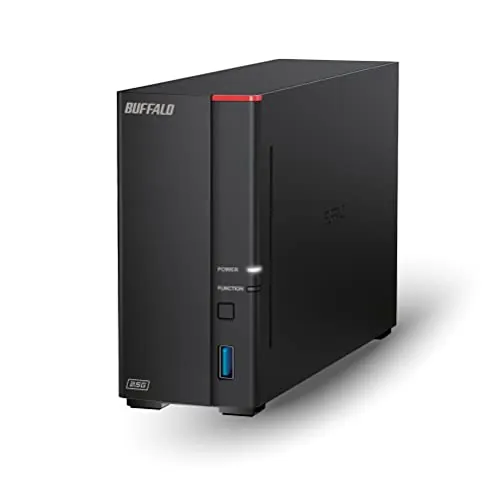
The BUFFALO LinkStation 710 is a compact one-bay network-attached storage device with a 2TB hard drive included. It is best suited to home users who want centralized storage, backups, and subscription-free personal-cloud access. Its feature and value scores are solid, but mixed feedback around reliability, speed, software, and compatibility limits its appeal for critical data duties.
Expert reviewed
64
Overall score
Data-driven scoring Expert reviewed Updated analysis

Why we ranked it highly

The BUFFALO LinkStation 710 2TB is a wired, one-bay NAS designed to connect to a router and make shared storage available to desktops and laptops on the same network. It includes a 2TB hard drive, Cat 6A Ethernet cable, AC adapter, NAS Navigator utility, and PC backup software. Buffalo presents it as a central location for files, automated backups, restricted folder sharing, and personal-cloud access without monthly storage fees. It also states that Dropbox, Azure, and OneDrive sync is supported for hybrid-cloud workflows. The compact unit is practical for a desk or router area, but its single-drive architecture means it has no built-in redundancy. Review evidence suggests the basic concept works well for some owners, while network detection, software navigation, transfer speed, and reliability can be inconsistent.
90-day review Expert reviewed User feedback Data scoring

Key specs

Item details

Brand
BUFFALO
Manufacturer
BUFFALO
UPC
747464134574
Mfr Part Number
LS710D0201
Model Number
LS710D0201
Built-In Media
AC Adapter, Ethernet Cable (Cat 6A), LinkStation 710D, Quick Setup Guide, Warranty Statement

Measurements

Item Dimensions D x W x H
8.07"D x 1.77"W x 5.02"H
Size
2TB (1x2TB)
Item Weight
1.66 Kilograms

Features & Specs

Compatible Devices
Desktop, Laptop
Mounting Type
Ethernet NAS Device

Additional details

Color
Black

User guide

Is Assembly Required
No

Scores breakdown

64 /100

Performance

74 /100

Features

61 /100

Usability

72 /100

Design

55 /100

App experience

100 /100

Display quality

100 /100

Audio quality

100 /100

Camera quality

Strengths

  • Includes a 2TB hard drive in a compact one-bay NAS enclosure.
  • Supports centralized network storage, automated computer backups, and folder-level access restrictions.
  • Subscription-free personal-cloud positioning and stated Dropbox, Azure, and OneDrive integration broaden storage options.
  • Supplied Cat 6A Ethernet cable, AC adapter, setup guide, NAS Navigator utility, and PC backup software reduce initial accessory needs.
  • Feature score of 74/100 and value score of 73/100 indicate a capable feature set for its price.
  • Buffalo states that 24/7 US-based support and a two-year warranty, including the hard drive, are provided.

Limitations

  • A single drive bay provides no built-in drive redundancy, so it should not be the only copy of important files.
  • Reliability is the weakest major area at 52/100, with customer feedback describing inconsistent long-term outcomes.
  • Usability, app experience, connectivity, and compatibility scores are modest, and some reviewers report difficult software navigation or network detection issues.
  • Speed feedback is mixed: some users report responsive access, while others describe slow transfers.
  • Reported compatibility concerns include Windows connection problems and lack of support for some Mac M1 systems, despite the stated Windows and macOS 26 compatibility.
  • Setup may require firmware updates, permission changes, subnet checks, or manual troubleshooting in less straightforward network environments.

Ideal user profiles

  • Home users who want a compact shared location for photos, music, videos, and documents.
  • Households seeking automated computer backups alongside local network storage.
  • Buyers who want personal-cloud access without an ongoing storage subscription.
  • Users comfortable checking network settings, permissions, and firmware updates when needed.
  • People using it as one layer in a wider backup plan rather than as their only data repository.

Use cases

  • Centralizing files from multiple desktops and laptops on a home network.
  • Scheduling PC backups with the included backup software.
  • Sharing selected folders with household members using individual access restrictions.
  • Creating a local archive for photos, music, videos, and documents.
  • Syncing selected data with Dropbox, Azure, or OneDrive as part of a hybrid-cloud workflow.
  • Accessing shared storage over Ethernet through a home router.

Fit and positioning

Who this works for

Category positioning

This is a value-focused home NAS rather than a high-resilience storage system. The included 2TB drive and 73/100 value score make it more self-contained than an empty NAS enclosure, while its 74/100 feature score reflects backup, access-control, personal-cloud, and cloud-sync functions. Its compact 1.66kg design also supports unobtrusive home placement. The main compromise is the one-bay layout: it is suited to simple shared storage and secondary backups, not to users who require internal drive redundancy for irreplaceable data.

Best for

The LinkStation 710 is best for home users who need a small, always-available place to centralize files and back up computers over Ethernet. It suits buyers who value included storage, folder permissions, and personal-cloud or hybrid-cloud options more than advanced expansion. Its 74/100 feature score, 82/100 portability score, and 73/100 value score support that role. It is most sensible when paired with an additional backup location for important data.

Not best for

Avoid this model if you need internal redundancy, consistently fast transfers, or a highly polished software experience. The single-drive design cannot protect against drive failure on its own, while reliability scores 52/100 and speed scores 61/100. Customer feedback also identifies occasional network connection, compatibility, and configuration problems. Buyers with complex Windows or Apple hardware environments should verify current support first, and users with irreplaceable files should not rely on this device as their sole copy.

Performance analysis

How it performs in practice

Each scoring dimension is separated into a compact card so the strengths and tradeoffs are easier to compare without reading one long block.

Performance analysis

The LinkStation 710 earns a 64/100 performance score, which points to adequate rather than consistently strong home-storage performance. Its core role is straightforward: provide shared Ethernet storage, support computer backups, and centralize household files. Reviews are split. One LS710 owner reported fast Finder access after setup, while the review overview includes descriptions of very slow operation. It appears appropriate for routine backups and file access, but the supplied evidence does not support treating it as a dependable high-throughput NAS for demanding transfers.

Feature analysis

A 74/100 feature score is one of this NAS's stronger results. Buffalo lists automated PC backup tools, NAS Navigator management software, folder-level access restrictions, SSL-encrypted file transfers, personal-cloud access, and synchronization with Dropbox, Azure, and OneDrive. These features cover the basics of home file centralization and sharing without requiring a cloud-storage subscription. The trade-off is that the single-bay design does not provide the multi-drive redundancy associated with more comprehensive NAS setups.

Usability analysis

Usability scores 61/100 because real-world setup and management appear uneven. Some reviewers found the quick guide and web interface easy enough for rapid installation, while others found the software hard to navigate or needed to change permissions before shares worked properly. The appliance-style approach may suit users with simple home networks, but less experienced owners may need to read the full manual, download software, and troubleshoot discovery or sharing settings.

Design

The LinkStation 710's 72/100 design score reflects a compact, functional network-storage format. Measuring 8.07 by 1.77 by 5.02 inches and weighing 1.66kg, it is narrow enough to sit near a router or on a desk without requiring a rack or large enclosure. The black, wired design prioritizes fixed placement and always-on access over portability. Its one-bay form also keeps the concept simple, although it limits future storage and redundancy options.

How it compares

Within the home NAS category, the LinkStation 710 emphasizes convenience: an included 2TB hard drive, small footprint, Ethernet sharing, backup software, personal-cloud access, and integrations with selected cloud services. This gives it a stronger out-of-box proposition than basic external drives for users who need multiple computers to access storage. Compared with NAS designs that use multiple bays, however, it lacks internal drive redundancy and expansion flexibility. Its mixed speed, connectivity, software, and reliability feedback also makes it less compelling for demanding users. It is better positioned for simple household file storage than for critical archives or performance-heavy workloads.

Ranking summary

The BUFFALO LinkStation 710 2TB receives an overall score of 64/100 because it combines useful home-NAS features with notable risk areas. Its strongest scores are portability at 82/100, features at 74/100, power efficiency at 74/100, value at 73/100, and design at 72/100. The included drive, backup tools, access controls, and cloud-sync support make it a practical entry point for shared storage. It ranks lower than more dependable solutions because reliability is only 52/100, while compatibility and app experience each score 55/100. Most importantly, the one-bay design has no internal redundancy, limiting its suitability for sole-copy storage.

Buying advice

Consider the LinkStation 710 2TB if you want compact Ethernet-attached storage with an included drive, automated backup capability, controlled folder sharing, and no required personal-cloud subscription. Before buying, confirm that your Windows or macOS hardware is currently supported and that your router network can place the NAS and computers on the appropriate subnet. Allow time for firmware updates and permissions setup. Do not choose it as the only location for irreplaceable files: the one-bay format has no redundancy and reliability feedback is mixed. Keep a second local or off-site backup, and read current warranty terms for support and recovery coverage.
64
Overall score

Final verdict

The BUFFALO LinkStation 710 2TB is an average-to-good entry-level home NAS with a sensible feature set and reasonable value. Its main strengths are the included 2TB drive, compact wired design, backup functions, access controls, personal-cloud positioning, and cloud-sync options. It can make sense for centralized household storage or as a secondary backup target. Its main limitation is confidence: customer feedback points to inconsistent reliability, software, network connectivity, compatibility, and transfer performance. The absence of a second drive bay further means it is not a complete data-protection solution. Buy it for convenience, but protect important files elsewhere too.
Back to review

Key topics

BUFFALO LinkStation 710 review, BUFFALO LinkStation 710 2TB NAS, 1-bay NAS review, home network attached storage, personal cloud storage device, NAS backup storage comparison, LinkStation 710 ranking

Frequently asked questions

Is the BUFFALO LinkStation 710 2TB worth it?
At its listed price of $172.46, the LinkStation 710 2TB offers an included drive, network storage, backup tools, personal-cloud functionality, and cloud-sync options. Its 73/100 value score is reasonable for buyers who need these features. However, inconsistent reliability and software feedback mean it is best treated as one part of a multi-copy backup plan.
Is the BUFFALO LinkStation 710 good for home backups?
It is designed for centralized storage and automated computer backups, with PC backup software and NAS Navigator included. A review of a related LS710 configuration reports successful Time Machine setup after firmware updates. Still, this is a one-bay model without redundancy, so important data should also exist on another local drive or off-site backup.
What are the main limitations of the BUFFALO LinkStation 710?
The central limitation is its single included drive: there is no second bay for built-in drive redundancy. Reliability scores 52/100, and reviews describe mixed results with failures, slow transfers, connection issues, and software complexity. Compatibility feedback is also inconsistent, so prospective owners should confirm their computer and network environment before buying.
Is the BUFFALO LinkStation 710 easy to set up?
Setup scores 65/100, reflecting a generally approachable but not friction-free experience. The supplied quick guide, Ethernet cable, and software help with basic installation, and some reviewers found setup simple. Others needed firmware updates, permission changes, same-subnet network adjustments, or support to complete configuration, particularly when the device was not detected.
Does the BUFFALO LinkStation 710 work with Mac and Windows?
Buffalo lists compatibility with Windows and macOS 26, and one supplied LS710 review describes successful Time Machine use on Mac Tahoe 26.2. However, the review overview also reports Windows connection issues and concerns involving Mac M1 support. Because the evidence is mixed, check current Buffalo compatibility documentation for your specific operating system and hardware.
How fast is the BUFFALO LinkStation 710 2TB?
Its speed score is 61/100, and customer feedback is inconsistent. One LS710 reviewer found Finder access fast after setup, while the broader review summary includes reports of very slow performance. Network equipment, source drives, Wi-Fi versus wired access, file sizes, and configuration can affect transfer results, so it is not a clear choice for consistently high-speed workloads.
Does the BUFFALO LinkStation 710 have cloud features?
Yes. Buffalo positions the device as subscription-free personal cloud storage for storing, managing, and accessing files, and states that it can sync with Dropbox, Azure, and OneDrive for hybrid-cloud use. These capabilities score as part of a 68/100 smart-features profile, but app and software experience feedback is less consistent at 55/100.
How does the BUFFALO LinkStation 710 compare with typical home NAS devices?
It emphasizes simplicity, compact size, included storage, backup capability, access controls, and cloud integration rather than multi-drive data protection. Its 74/100 feature score and 73/100 value score are positive, but its 52/100 reliability score and one-bay design are important trade-offs. Multi-bay NAS options can offer redundancy, whereas this model requires separate backups for resilience.

Related Guides & Rankings

Comparisons featuring this product