ElectronicsRanker
Menu

Review

CableCreation USB C to USB A Cable 5FT Review

The CableCreation CC1357 is a 5-foot USB-A-to-USB-C cable designed for charging, high-speed data transfer and compatible Android Auto or CarPlay connections. It scores particularly well for setup, data performance and customer satisfaction, making it a practical choice for USB-C phones and external SSDs connected to USB-A ports. Buyers should be aware of mixed feedback about stiffness and occasional connection dropouts.
Expert reviewed
84
Overall score
Data-driven scoring Expert reviewed Updated analysis

Why we ranked it highly

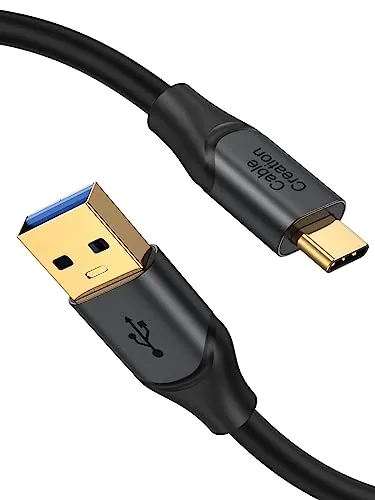
The CableCreation CC1357 is a 1.5m male USB-A to male USB-C cable for devices that need to connect to a traditional USB-A port. The listing states USB 3.2 Gen 2 data rates up to 10Gbps and 3A charging, with compatibility claimed for USB-C external SSDs, phones, tablets, iPads and USB-C MacBooks. Its clearest use cases are transferring files to a compatible SSD and providing a wired in-car connection for Android Auto or CarPlay. The cable receives an overall score of 84, with strong marks for speed, setup, build quality and compatibility. Its stated aluminum-alloy shells, gold-plated connectors, 24-month replacement period and lifetime technical support add reassurance. However, it is not a video cable, does not work between two laptops, and review feedback on flexibility and connection stability is not completely uniform.
90-day review Expert reviewed User feedback Data scoring
Key specs

Features & Specs

Connector Type
USB Type A, USB Type C
Cable Type
USB
Compatible Devices
Laptop, SSD, Smartphone, Tablet, iPhone 16/ iPhone16 Plus/ iPhone 16 Pro Max/ iPhone 15 /iPhone 15 Plus /iPhone 15 Pro /15 Pro Max, SamSung Galaxy S24 / S24 Ultra / S24+/ S23 / S23+ / 23 Ultra / S22+ / S22 Ultra / S22 / S21 / S21+ / S20 / S10+ / S10e / S10 / S9 / S9+ ,Galaxy Note 20/20 ultra/Note 10/10+/10 Plus/Note 9/Note8/7 Galaxy Z Fold5/4/3/2+, Galaxy z flip 5/4/3, Galaxy A55/A54/A53/A52/A51+, Galaxy Tab A9/Tab A9+/Tab A 8.4 (2020)/Tab A7 Lite/Tab A7 10.4 (2022)+, Pixel 8 / 8Pro / 8A / 7 / 7Pro / 7A / 6 / 5 / 4 / 3, USB-C MacBook, iPad
Other Special Features of the Product
High Speed
Compatible Phone Models
iPhone 16, iPhone 16 Plus, iPhone 16 Pro Max, iPhone 15, iPhone 15 Plus, iPhone 15 Pro, iPhone 15 Pro Max, Samsung Galaxy S24, Samsung Galaxy S24 Ultra, Samsung Galaxy S24+, Samsung Galaxy S23, Samsung Galaxy S23+, Samsung Galaxy S23 Ultra, Samsung Galaxy S22+, Samsung Galaxy S22 Ultra, Samsung Galaxy S22, Samsung Galaxy S21, Samsung Galaxy S21+, Samsung Galaxy S20, Samsung Galaxy S10+, Samsung Galaxy S10e, Samsung Galaxy S10, Samsung Galaxy S9, Samsung Galaxy S9+
Connector Gender
Male-to-Male
Data Transfer Rate
10 Gigabytes Per Second
Number of Pins
28

User guide

Recommended Uses For Product
Charging, Data Transfer
Indoor Outdoor Usage
Indoor, Outdoor

Measurements

Unit Count
1.0 Count
Item Weight
1.76 Ounces
Number of Items
1

Item details

Brand Name
CableCreation
Model Name
USB A to USB C Cable
Model
CC1357
Manufacturer
CableCreation
Part Number
CableCreation
Included Components
1*5ft usb a to c cable 10Gbps 3A
External Testing Certification
Não aplicável

Style

Color
Dark Black
Item Shape
Round

Scores breakdown

88 /100

Performance

84 /100

Features

84 /100

Usability

80 /100

Design

83 /100

Connectivity

88 /100

Speed

82 /100

Reliability

85 /100

Compatibility

Strengths

  • Advertised USB 3.2 Gen 2 data capability of up to 10Gbps for compatible USB-A and USB-C devices.
  • Strong setup score of 92 reflects a simple plug-in cable format with no software or configuration requirement.
  • Customer feedback frequently praises stable Android Auto and CarPlay connections.
  • Build and durability scores of 86 align with the aluminum-alloy connector shells and gold-plated connectors stated in the listing.
  • Broad stated compatibility with USB-C phones, tablets, MacBooks, iPads and external SSDs.
  • Includes a stated 24-month replacement period and lifetime technical support.

Limitations

  • It does not support video output, so it is not a USB-C display cable.
  • It cannot transfer data or charge between two laptops.
  • Some customers report intermittent disconnections, despite many positive connection reports.
  • Feedback on flexibility is mixed; several buyers describe the cable as stiff or inflexible.
  • USB-IF certification is not stated in the supplied information.
  • The USB-A connector limits use with USB-C-only hosts unless an adapter or suitable port is available.

Ideal user profiles

  • Drivers who need a wired data cable for Android Auto or CarPlay with a USB-A vehicle port.
  • External SSD users transferring files between a USB-A computer and a USB-C drive.
  • Owners of USB-C iPhones, Galaxy phones, Pixels, iPads or USB-C laptops needing a 5-foot cable.
  • Buyers who value a stated replacement period and technical support with a low-cost cable.

Use cases

  • Connecting a USB-C phone to Android Auto in a vehicle with a USB-A port.
  • Using CarPlay with a compatible USB-C iPhone and USB-A vehicle connection.
  • Transferring data to or from a compatible USB-C external SSD.
  • Charging a compatible USB-C device at up to the stated 3A rating.
  • Connecting compatible USB-C phones or tablets to a USB-A computer for data transfer.
  • Keeping a 1.5m cable at a desk, in a vehicle, or in a travel kit.

Fit and positioning

Who this works for

Category positioning

This is a value-focused, data-capable USB-A to USB-C cable rather than a basic charging-only lead. At $11.94, it is positioned for users who need a 5-foot cable with a stated 10Gbps transfer capability, especially for external SSDs and vehicle infotainment. The 84 overall score places it as a strong general-purpose choice, not a specialist display or laptop-to-laptop cable. Its feature set is practical, but the lack of stated USB-IF certification and no video output keep it from being a universal USB-C solution.

Best for

This cable is best for people connecting USB-C phones, tablets or SSDs to USB-A ports. It is especially compelling for compatible Android Auto and CarPlay users, as multiple reviews cite dependable in-car data connections. The speed score of 88 and compatibility score of 85 also make it a sensible fit for compatible USB-C external SSD transfers. It suits buyers wanting a 5-foot cable with a stated support policy rather than the lowest-cost charging lead.

Not best for

Avoid this cable if you need USB-C video output, a USB-C-to-USB-C connection, or laptop-to-laptop charging or data transfer; the listing specifically excludes those uses. It may also be less appealing to buyers who prioritize a very soft, highly flexible lead, since several reviews mention stiffness. While many users report stable connections, those troubleshooting a persistent vehicle, phone or port issue should not assume the cable will solve every disconnect problem.

Performance analysis

How it performs in practice

Each scoring dimension is separated into a compact card so the strengths and tradeoffs are easier to compare without reading one long block.

Performance analysis

For its core job of carrying data and power between USB-A and USB-C devices, the CC1357 performs strongly on paper and in much of the supplied feedback. Its performance score is 88, and the listing states up to 10Gbps USB 3.2 Gen 2 transfer speeds with compatible hardware. Reviews include successful phone-to-PC use, external-device data use and reliable Android Auto connections. Performance remains dependent on the USB ports and devices at both ends, while some customers do report disconnections.

Feature analysis

The core feature set is focused rather than broad: USB-A and USB-C male connectors, stated 10Gbps data capability, 3A charging and a 5-foot length. It is backward compatible with older USB standards according to the listing, and is presented as suitable for compatible Android Auto, CarPlay and USB-C SSD use. The feature score of 84 is held back by clear boundaries: there is no video output, no laptop-to-laptop support and no stated USB-IF certification.

Usability analysis

Daily use is straightforward because the cable requires no app, driver or configuration for ordinary charging and data tasks. Its usability score of 84 reflects that simplicity, and the 5-foot length can offer more placement flexibility than a short vehicle or desk cable. In a car, users still need compatible hardware and correct phone settings. Physical handling is the main caveat: feedback is divided between buyers who find it pliable and those who consider it stiff.

Design

The CC1357 uses a simple round, dark-black 5-foot cable design with USB-A at one end and USB-C at the other. It is physically practical for cars, desks and external-drive connections, but that same length may be more cable than needed for compact travel or short in-car runs. The design score of 80 reflects a functional layout rather than an unusually refined one. Flexibility is the notable design question, with mixed customer views on stiffness.

How it compares

Within the USB-A-to-USB-C category, this cable stands apart from charging-only options by advertising up to 10Gbps data transfer and targeting external SSD, Android Auto and CarPlay use. Its 5-foot length is more versatile than a very short lead for vehicle or desk use, while its stated 3A charging broadens its everyday utility. Compared with more fully featured USB-C cables, it has clear limits: no video output, no USB-C-to-USB-C use and no two-laptop support. Its build and satisfaction scores are strong, but buyers who prioritize formal USB-IF certification or maximum flexibility may prefer to compare alternatives carefully.

Ranking summary

The CableCreation CC1357 earns an 84 overall score because it addresses the essentials of a USB-A-to-USB-C cable well: fast stated data capability, broad device compatibility, simple setup and solid customer feedback. Its strongest scores are setup at 92, customer satisfaction at 90, and both performance and speed at 88. Build quality and durability also score 86, matching the sturdy-material claims and positive review patterns. It does not score higher because reliability is 82, with some reports of disconnections, while design and power efficiency are less standout at 80 and 78. It ranks as a strong data-focused cable, not a universal USB-C solution.

Buying advice

Consider the CC1357 if your host device, car or computer has USB-A and your phone, tablet or SSD uses USB-C. It is particularly relevant for a compatible wired Android Auto or CarPlay setup, and for users seeking the stated 10Gbps data capability for external storage. Before buying, confirm that you do not need display output or a USB-C-to-USB-C connection. For Android Auto, verify OTG compatibility and settings on the phone and vehicle. If flexibility is important for tight cable routing, weigh the mixed stiffness feedback. The stated 24-month replacement period is a useful extra to verify at purchase.
84
Overall score

Final verdict

The CableCreation USB C to USB A Cable 5FT is a strong option in the USB-A-to-USB-C cable category, with an 84 overall score. Its main strengths are its stated 10Gbps data capability, easy plug-and-play setup, broad claimed compatibility and especially positive feedback for Android Auto, CarPlay and reliable data connections. The primary limitation is that it is purpose-specific: it has no video output, cannot connect two laptops, and some buyers report stiffness or intermittent disconnects. For a compatible USB-A car, computer or external SSD setup, it offers a practical feature-to-price balance at $11.94.
Back to review

Key topics

CableCreation USB C to USB A Cable review, CableCreation CC1357 review, USB A to USB C 10Gbps cable, Android Auto USB C cable, CarPlay USB A to USB C cable, USB-C external SSD cable, best USB 3.2 Gen 2 cable

Frequently asked questions

Is the CableCreation USB C to USB A Cable worth buying?
With an overall score of 84 and a price of $11.94, this is a well-rounded option for USB-A-to-USB-C data and charging tasks. Its strongest evidence is for straightforward setup, high-speed data use, durability and customer satisfaction. Buyers should still note the mixed reports on flexibility and occasional disconnections.
Is this CableCreation cable good for Android Auto?
It appears particularly suitable for compatible wired Android Auto setups. Several supplied reviews report stable connections after problems with other cables, and the listing specifically positions it for Android Auto. The phone, vehicle USB port and OTG settings must also support the connection, so the cable alone cannot resolve every compatibility issue.
Can this cable transfer files to a USB-C external SSD?
Yes, the listing states support for USB-C external SSDs and up to 10Gbps USB 3.2 Gen 2 data transfer with compatible devices. Its speed score is 88, which supports its ranking as a strong data-focused cable. Actual transfer speed will also depend on the host port, SSD and connected device.
Does the CableCreation USB A to USB C cable support video output?
No. The supplied product information explicitly says that this cable does not support video output. It should not be bought for connecting a USB-C device to a monitor, television or other display. Its intended uses are data transfer, device charging and compatible in-car phone connections.
Is the CableCreation USB C to USB A Cable easy to set up?
Yes. The cable earns a setup score of 92 because it is a direct male USB-A-to-male USB-C connection without an app or software installation. For Android Auto, the listing advises confirming that the vehicle and phone support the required OTG function and that the setting is enabled.
How durable is this CableCreation cable?
Durability scores 86, supported by the listing's aluminum-alloy connector shells and gold-plated connectors. Customer feedback commonly describes the cable as good quality or sturdy. However, the available reviews do not establish long-term performance across all conditions, and some buyers find the cable relatively stiff.
Is it compatible with iPhone 15 and iPhone 16 models?
The supplied compatibility list includes USB-C iPhone 15 and iPhone 16 models. This makes it relevant for cars or computers with a USB-A port, subject to the connected host supporting the intended charging or data function. It is not compatible with iPhones that use a Lightning port.
What are the main drawbacks of this USB-A to USB-C cable?
The key limitations are functional and practical rather than basic usability. It has no video-output support and cannot charge or transfer data between two laptops. Reviews are mixed on connection consistency and flexibility, while USB-IF certification is not stated in the available product information.

Related Guides & Rankings