ElectronicsRanker
Menu

Review

Western Digital 14TB Elements Desktop External Hard Drive Review

The Western Digital 14TB Elements Desktop is a high-capacity external hard drive aimed at backup, archiving, and bulk file storage. It stands out most for simple plug-and-play desktop use and strong storage value. The main trade-offs are mixed reliability feedback, modest speed for a modern storage device, and a desktop-only design that requires external power.
Expert reviewed
73
Overall score
Data-driven scoring Expert reviewed Updated analysis

Why we ranked it highly

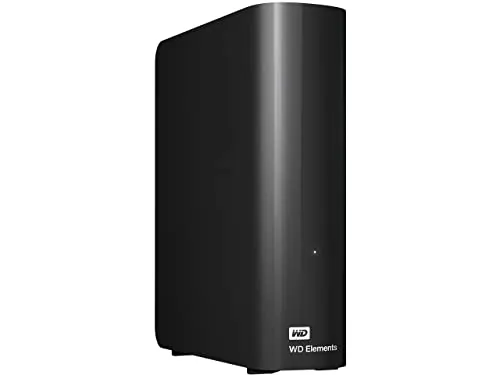
The Western Digital 14TB Elements Desktop External Hard Drive is a 3.5-inch mechanical USB external drive built for high-capacity personal storage. Based on the supplied data, it is primarily positioned as a straightforward desktop backup and archive solution rather than a fast working drive or a travel-friendly portable device. The product offers 14TB of capacity, USB 3.0 connectivity with USB 2.0 backward compatibility, and plug-and-play setup for Windows PCs. Its strongest appeal is practical: large storage space, easy setup, and generally good value for users with big media libraries, backups, or project files. Scores support that profile, with particularly strong results for setup, usability, value, and customer satisfaction. The weaker areas are reliability, durability, app experience, and portability. Review feedback also points to mixed speed impressions and variable noise levels, so it appears better suited to stationary bulk storage than performance-focused or silence-sensitive environments.
90-day review Expert reviewed User feedback Data scoring

Key specs

Features & Specs

Digital Storage Capacity
14 TB
Hard Disk Interface
USB 2.0/3.0
Connectivity Technology
USB
Additional Features
Portable
Hard Disk Form Factor
3.5 Inches
Compatible Devices
Desktop, Laptop
Specific Uses For Product
Personal
Read Speed
113.5 Megabytes Per Second
Media Speed
5 Gigabits Per Second
Cache Memory Installed Size
14
Data Transfer Rate
5 Gigabits Per Second
Form Factor
3.5-inch
Hardware Connectivity
USB
Hardware Platform
Mac, PC

Measurements

Hard-Drive Size
14 TB
Item Weight
2.67 Pounds
Item Dimensions L x W x Thickness
6.53"L x 5.31"W x 1.89"Th
Number of Items
1

Item details

Brand
WD
Model Number
WDBWLG0140HBK-NESN
Hard Disk Description
Mechanical Hard Disk
Built-In Media
WD Elements hard drive USB cable AC adapter Quick Install Guide
Model Name
Elements Desktop
Manufacturer
Western Digital Technologies, Inc.
Global Trade Identification Number
00718037873022
UPC
718037873022
Mfr Part Number
WDBWLG0140HBK-NESN
Item Type Name
HDD

User guide

Installation Type
External Hard Drive

Additional details

Color
Black
Enclosure Material
Aluminum

Scores breakdown

78 /100

Performance

70 /100

Features

86 /100

Usability

70 /100

Design

55 /100

App experience

72 /100

Connectivity

67 /100

Speed

62 /100

Reliability

Strengths

  • Large 14TB capacity suited to bulk backups, media libraries, and long-term file storage.
  • Very easy setup, with plug-and-play use on Windows PCs and a high setup score of 92.
  • Good value profile for a high-capacity desktop external hard drive, supported by a value score of 82.
  • USB 3.0 connectivity supports faster transfers than older USB 2.0 connections and remains backward compatible.
  • Strong overall customer sentiment, with a 4.5/5 rating across 27,645 reviews.
  • Review feedback repeatedly highlights convenient backup use and straightforward day-to-day operation.

Limitations

  • Reliability is the main concern, with mixed reports including some failures after only a few months.
  • Speed feedback is inconsistent, and the speed score of 67 suggests it is adequate rather than class-leading.
  • Noise levels vary by user, with some reviewers reporting noticeable hum, seek noise, or clicking during access.
  • It is not well suited to travel or casual portability because it is a desktop 3.5-inch drive that uses an AC adapter.
  • Out-of-box setup is aimed at Windows PCs, so Mac use may require reformatting depending on the intended workflow.
  • App and software experience appears limited, reflected in a modest app experience score of 55.
  • Warranty and recovery confidence are not especially strong based on the supplied support-related feedback.

Ideal user profiles

  • Users who need high-capacity backup storage for desktops or home offices.
  • People archiving large video, photo, or project libraries at a lower cost per terabyte than SSDs.
  • Windows users who want a simple plug-and-play external HDD with minimal setup friction.
  • Buyers looking for a secondary backup drive rather than a travel-friendly everyday carry device.

Use cases

  • Backing up large personal file collections and system images.
  • Storing high-resolution video files, photos, and media archives.
  • Expanding desktop or laptop storage for older projects and infrequently accessed data.
  • Keeping a dedicated archive drive for games, recordings, or long-term file retention.
  • Using as a stationary bulk-storage drive for home creative workspaces.
  • Maintaining a second copy of important files as part of a manual backup routine.

Fit and positioning

Who this works for

Category positioning

Within the external storage category, this WD Elements model sits as a capacity-focused desktop HDD aimed at buyers who want a lot of space without moving to more expensive SSD storage. It is better described as a practical mid-range-to-value desktop option than a premium performance drive. The scores suggest a product that does the basics well, especially setup and everyday usability, while accepting trade-offs in speed, portability, and long-term confidence.

Best for

This drive is best for users who need lots of stationary storage for backups, archives, media collections, or large personal file libraries. Its high setup score of 92, usability score of 86, and value score of 82 make it especially suitable for people who want a simple external HDD that works with minimal effort. It also makes more sense as a secondary or backup drive than as the sole home for critical data.

Not best for

This is not the best fit for users who need portability, quiet operation under load, or top-tier transfer performance. The portability score of 25 reflects its desktop form factor and required AC adapter, while the speed score of 67 suggests only moderate performance. Buyers storing irreplaceable data should also be cautious because review feedback includes some early failure reports and support confidence appears limited.

Performance analysis

How it performs in practice

Each scoring dimension is separated into a compact card so the strengths and tradeoffs are easier to compare without reading one long block.

Performance analysis

For its main job of bulk storage and backup, the WD Elements Desktop performs reasonably well rather than exceptionally. Its performance score of 78 indicates solid category performance for a mechanical external drive, and the listed read speed is 113.5MB/s. Customer feedback suggests it handles large backups, media storage, and archive tasks effectively, but speed impressions are mixed. That means it appears well suited to long-term storage and large file transfers, while being less appealing for workloads where quick access and consistently high throughput matter most.

Feature analysis

The feature set is straightforward. You get 14TB of mechanical storage, USB connectivity with USB 3.0 and USB 2.0 support, and simple desktop operation. That keeps the experience practical, but the feature score of 70 shows it is not especially advanced. There is no strong evidence here of premium extras, rich software tools, or specialist features. Its appeal is capacity and simplicity rather than breadth of functionality.

Usability analysis

Usability is one of this drive's stronger areas, reflected in an 86 score. The supplied description emphasizes plug-and-play use for Windows PCs, and multiple reviews say the drive is easy to connect and start using. For day-to-day backup and archive tasks, that low-friction experience matters. The main practical limitation is that desktop power is required, so while operation is simple, placement and cable management are less convenient than with bus-powered portable drives.

Design

The design is functional and understated, with a compact-for-capacity desktop footprint and a simple black enclosure. At 6.53 by 5.31 by 1.89 inches, it is small enough to sit unobtrusively on a desk for a 3.5-inch external HDD. The design score of 70 suggests this is more about practicality than refinement. Review comments indicate that it stays out of the way well, but its desktop format and power brick reduce flexibility compared with smaller portable drives.

How it compares

Compared with external storage products in general, the WD Elements Desktop stands out more for capacity and simplicity than for speed or advanced features. It fits the traditional desktop HDD profile: better value per terabyte than faster solid-state options, but with compromises in transfer speed, portability, and mechanical-drive noise. Its usability and setup scores are stronger than its hardware confidence scores, which suggests it is easier to own than it is impressive on paper. Buyers choosing between desktop HDDs and portable SSDs will likely see this as the better option for economical bulk storage, but not for fast active project work or frequent travel use.

Ranking summary

This product ranks as a strong but not risk-free option in the desktop external hard drive category. Its overall score of 73 is lifted by excellent setup at 92, strong usability at 86, good value at 82, and healthy customer satisfaction at 84. Those strengths make it appealing for buyers who want simple, high-capacity backup storage without paying SSD-level prices. What holds it back from ranking higher is its weaker reliability score of 62, durability score of 60, modest speed score of 67, and very low portability score of 25. In short, it scores best as a practical desktop backup drive rather than a premium or performance-led storage choice.

Buying advice

Consider this drive if your main goal is affordable, high-capacity desktop storage for backups, archives, media libraries, or infrequently accessed files. It makes the most sense for stationary use where plug-and-play simplicity matters more than top speed. Before buying, check that the desktop form factor, external power requirement, and formatting needs fit your setup, especially if you use both Mac and Windows. If you need a quiet drive, portable use, or stronger confidence for mission-critical primary storage, this is less convincing. For important files, plan on keeping a second backup regardless of the brand or capacity you choose.
73
Overall score

Final verdict

The Western Digital 14TB Elements Desktop External Hard Drive is a strong mainstream option for buyers who need lots of desktop backup and archive storage at a sensible cost per terabyte. Its biggest strengths are high capacity, very easy setup, and good overall value, supported by strong customer satisfaction. Its biggest limitation is uneven confidence in long-term reliability, alongside only moderate speed and a non-portable desktop design. Overall, this is a good fit for bulk storage and backup duties, but it is best approached as part of a broader backup strategy rather than the only home for important data.
Back to review

Key topics

Western Digital 14TB Elements Desktop External Hard Drive review, WD Elements Desktop 14TB review, best desktop external hard drive, 14TB external hard drive comparison, USB 3.0 external hard drive review, WD external HDD for backup, desktop backup hard drive, high capacity external hard drive, WD Elements Desktop ranked, external hard drive for media storage

Frequently asked questions

Is the Western Digital 14TB Elements Desktop External Hard Drive worth it?
For buyers who need a lot of low-cost storage in one place, it looks like a worthwhile option. Its strongest points are capacity, simple setup, and value, backed by a 4.5/5 rating from 27,645 reviews. The main caution is reliability, as some customers report failures and mixed long-term consistency.
Is the WD Elements Desktop 14TB good for backups?
Yes, backup use is one of the clearest strengths in the supplied data. Customers frequently describe it as an effective backup and archive drive, and its 14TB capacity gives plenty of room for large files, media collections, and system images. It is best treated as backup storage rather than as your only copy of important data.
How fast is the Western Digital 14TB Elements Desktop drive?
The listed read speed is 113.5MB/s, and the drive uses USB 3.0 for higher-bandwidth connections than USB 2.0. In practice, review feedback on speed is mixed. Some users praise transfer performance, while others find it slow, which fits its moderate speed score of 67.
Is the WD Elements Desktop easy to set up?
Yes. Setup is one of its best areas, with a setup score of 92. The supplied information describes it as plug-and-play ready for Windows PCs, and many reviews say it works right out of the box with little or no configuration.
Can the Western Digital 14TB Elements Desktop be used with Mac and PC?
The specifications list Mac and PC hardware platform compatibility, but formatting matters. It is described as plug-and-play for Windows PCs, and several reviews note that Mac use may require reformatting depending on how you want to read and write files across systems.
Is this external hard drive portable?
Not really. Despite the listing mentioning portable as an additional feature, the product is a 3.5-inch desktop drive that weighs 2.67 pounds and uses an AC adapter. Its portability score of 25 reflects that it is much better suited to stationary desktop use than regular travel.
Does the WD Elements Desktop 14TB run quietly?
Noise levels appear inconsistent. Some reviewers describe quiet operation or only a soft hum, while others report louder spinning or clicking noises during activity. If you are sensitive to drive noise, especially on a quiet desk, this is something to consider before buying.
What are the main limitations of the Western Digital 14TB Elements Desktop?
The biggest limitations are mixed reliability reports, desktop-only portability, and variable acoustic performance. Speed is also adequate rather than standout, and support confidence appears more limited than the stronger areas like setup and value.

Related Guides & Rankings