#1 Overall Winner
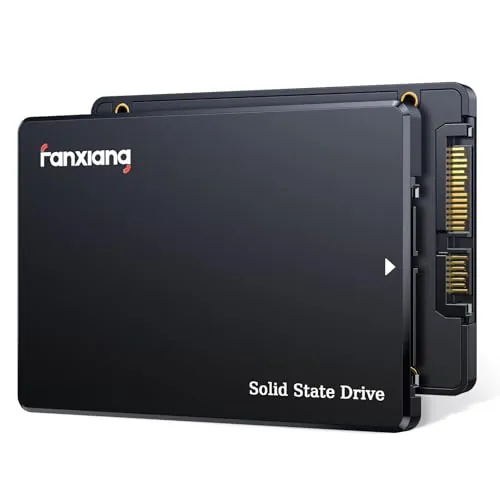
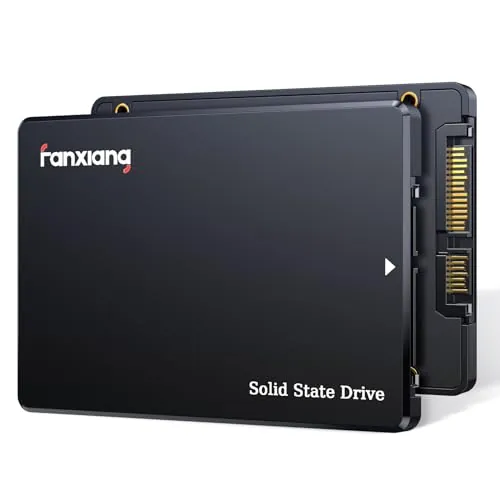
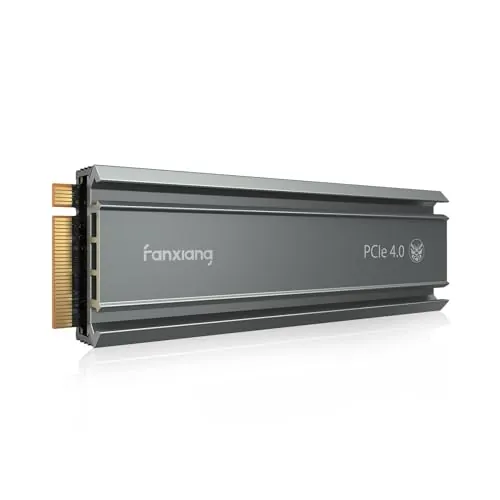
fanxiang S101Q 256GB SATA SSD
- 2.5-inch SATA format supports straightforward upgrades in many older laptops and desktops.
Comparison
The fanxiang S101Q is a 256GB 2.5-inch SATA SSD for systems that need a conventional SATA upgrade, while the S500 Pro is a 512GB M.2 PCIe Gen3 x4 NVMe drive for compatible computers. The S500 Pro is the overall higher-scoring drive with much faster rated speeds and more capacity, but the S101Q is the better fit when a system has only a 2.5-inch SATA connection.
#1 Overall Winner
Contender
Choose the fanxiang S500 Pro 512GB for a confirmed M.2 NVMe-compatible PC, more storage, and far higher rated speeds. Choose the fanxiang S101Q 256GB when replacing a 2.5-inch SATA hard drive or working with a SATA-only system.
Overall winner
Depends on your needs
| Feature | fanxiang S101Q 256GB SATA SSD | fanxiang S500 Pro 512GB NVMe SSD | Winner |
|---|---|---|---|
| Overall assessment | Overall score: 74 | Overall score: 82 | fanxiang S500 Pro 512GB NVMe SSD |
| Interface and form factor | 2.5-inch SATA III | M.2 2280 PCIe Gen3 x4 NVMe | Depends |
| Capacity | 256GB | 512GB | fanxiang S500 Pro 512GB NVMe SSD |
| Rated read speed | Up to 530MB/s | Up to 3200MB/s | fanxiang S500 Pro 512GB NVMe SSD |
| Rated write speed | Up to 420MB/s | Up to 1300MB/s | fanxiang S500 Pro 512GB NVMe SSD |
| Performance | Performance score: 79 | Performance score: 87 | fanxiang S500 Pro 512GB NVMe SSD |
| Setup | Setup score: 88 | Setup score: 92 | fanxiang S500 Pro 512GB NVMe SSD |
| Compatibility | Compatibility score: 83 | Compatibility score: 76 | fanxiang S101Q 256GB SATA SSD |
| Reliability | Reliability score: 61 | Reliability score: 71 | fanxiang S500 Pro 512GB NVMe SSD |
| Portability | 1.6oz; 2.5-inch drive | 0.06lb; M.2 2280 board | fanxiang S500 Pro 512GB NVMe SSD |
| Included accessories | Not specified | Screw and screwdriver; heat stickers | fanxiang S500 Pro 512GB NVMe SSD |
| Warranty and support | 3-year service; lifetime technical support | 3-year quality assurance | fanxiang S500 Pro 512GB NVMe SSD |
The S500 Pro is the clear performance choice for a compatible NVMe system. Its rated read speed is up to 3200MB/s and write speed up to 1300MB/s, compared with up to 530MB/s and 420MB/s for the SATA-based S101Q. Both drives are intended to make systems feel more responsive than a mechanical hard drive, but the S500 Pro has more headroom for demanding application loading, game loading, and larger file transfers. The S101Q remains appropriate for a SATA-only upgrade, where its rated performance is aligned with the interface's limits.
The S500 Pro wins decisively on rated speed. It is specified at up to 3200MB/s read and 1300MB/s write, versus up to 530MB/s read and 420MB/s write for the S101Q. Its higher speed score is consistent with that advantage. The difference is most meaningful for sustained transfers and workloads that can use NVMe bandwidth; for a basic SATA-only upgrade, the S101Q can still substantially improve boot and app response compared with an HDD.
Reliability is a caution area for both drives. The supplied reliability score favors the S500 Pro, and many reviews report stable everyday use for each model. However, the S101Q has feedback mentioning failures and capacity concerns, while the S500 Pro has feedback about an early failure and a drive that would not initialize. These reports do not establish a universal outcome, but they support maintaining current backups and testing a new drive during the return period.
Both products score well for usability, and review feedback commonly calls installation straightforward. The S500 Pro has a small supplied usability advantage and includes mounting hardware, which can simplify an M.2 installation. However, physical usability depends on the host computer: a 2.5-inch SATA replacement may be easier in an older machine designed around a hard-drive bay, while an M.2 upgrade is more convenient in a system with an accessible compatible slot.
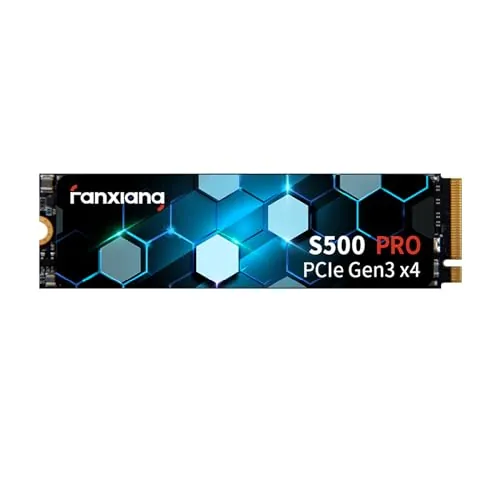
The designs serve different internal layouts. The S101Q is a 2.5-inch, 7mm SATA drive that fits hardware built for conventional laptop drives. The S500 Pro is a thin M.2 2280 module that mounts directly to a compatible motherboard slot and is better suited to compact modern systems. The S500 Pro has the higher design score, but the S101Q is more practical when a computer's storage layout is based on a 2.5-inch bay.
The S500 Pro has the higher supplied build-quality score and adds graphite heat-dissipation stickers. Its M.2 board is very compact, while the S101Q uses a 7mm polycarbonate 2.5-inch enclosure and is described as shock resistant. Both use solid-state storage with no internal mechanical mechanism. The provided data supports a modest build-quality advantage for the S500 Pro, but neither listing provides detailed long-term construction testing.
The S500 Pro has the higher durability score and lists graphite heat control plus an endurance rating of up to 320TBW. The S101Q emphasizes shock resistance and its solid-state design, which avoids moving parts. Both should be more resistant to physical shock than a mechanical drive, but the provided evidence does not justify a broad long-term durability claim for either model. Isolated failure feedback remains relevant for both.
Both drives are lightweight internal storage devices, but the M.2 S500 Pro is more compact and earns the higher portability score. The S101Q weighs 1.6 ounces and measures 3.94 by 2.76 by 0.28 inches; the S500 Pro measures 3.15 by 0.87 by 0.08 inches and weighs 0.06 pounds. The S101Q may be easier to use externally with a SATA-to-USB enclosure, whereas the S500 Pro needs an NVMe-capable enclosure for external use.
Both SSDs use 3D NAND and SLC cache technology, with shock-resistant solid-state construction. The S101Q lists SATA-focused maintenance and data-management support including garbage collection, wear leveling, RAID, ECC, TRIM, and S.M.A.R.T. The S500 Pro specifies TLC NAND, graphite heat-dissipation stickers, up to 320TBW endurance, and bundled screw and screwdriver. The S500 Pro has the broader listed package, while the S101Q emphasizes SATA-drive maintenance features.
Setup scores are high for both products, with the S500 Pro slightly ahead. Reviews describe the S101Q as a straightforward drop-in replacement and praise the S500 Pro as easy to install or plug and play. The S500 Pro includes a screw and screwdriver, while installation of the S101Q may involve removing a drive shield or using the hardware already present in the computer. In either case, operating-system installation, cloning, formatting, and BIOS settings can vary by system.
The S101Q is better for compatibility in the broad practical sense because it uses the established 2.5-inch SATA format and is stated to work with Windows, Linux, Mac OS, laptops, desktops, and all-in-one computers. The S500 Pro is also stated to support several Windows versions and Mac OS 10.9 or later, but it specifically requires a motherboard with an M.2 interface. Buyers must verify that an M.2 slot supports PCIe NVMe rather than SATA-only M.2 storage.
Connectivity is the defining difference. The S101Q uses SATA III 6Gb/s and is stated to be backward compatible with SATA II and SATA interfaces. The S500 Pro uses PCIe Gen3 x4 NVMe 1.4 and needs an M.2 interface with NVMe support. The S500 Pro has the higher connectivity score because its interface enables greater bandwidth, but the S101Q has the higher compatibility score due to the broader practical availability of SATA in older systems.
Both solid-state drives avoid the moving parts of a hard disk and have strong supplied power-efficiency scores. The S101Q holds a small score advantage. The S500 Pro's heat-dissipation stickers are intended to help manage heat, but the provided data does not include measured power draw, standby consumption, or thermal results. For this comparison, there is not enough evidence to make a strong real-world efficiency distinction.
The S500 Pro has the stronger supplied value score because it pairs a higher-capacity 512GB configuration with much faster rated NVMe speeds, included installation accessories, and positive review feedback on responsiveness and value. The S101Q also scores well for value and is not automatically the weaker purchase: it can be the sensible option for a SATA-only computer where an NVMe drive cannot be installed. The best value is therefore the drive that matches the system interface and required capacity.
Both drives come from fanxiang, so there is no brand-versus-brand distinction in this comparison. The S500 Pro has a higher supplied brand-trust score, likely reflecting stronger overall review and product scoring data. Still, both listings contain a mix of positive reports and isolated reliability concerns. Buyers who prioritize confidence should consider the stated three-year coverage, retailer return policy, and a backup plan rather than relying on brand perception alone.
Both drives have strong Amazon customer feedback: the S101Q has 4.5 out of 5 stars from 5,646 reviews, while the S500 Pro has 4.6 out of 5 stars from 6,028 reviews. The S500 Pro also has the higher customer-satisfaction score. Reviews for both frequently praise performance, easy installation, and value. Negative feedback for each centers on isolated failure or compatibility experiences, so positive aggregate ratings should be considered alongside the need for backups.
Both models list three-year coverage. The S101Q states three years of after-sales service and lifetime technical support, while the S500 Pro states a three-year quality-assurance service. The S500 Pro has the higher supplied warranty-and-support score. Because detailed claim procedures and return policies are not provided, buyers should confirm coverage terms through the seller before purchase.
The fanxiang S500 Pro 512GB NVMe SSD is the best overall option in this comparison. It has the higher overall score, 512GB capacity, substantially faster rated read and write performance, a compact M.2 design, bundled mounting hardware, and stronger supplied results for value, satisfaction, and reliability. It is the clear choice for a laptop or desktop with a confirmed M.2 PCIe NVMe slot.
The fanxiang S101Q 256GB SATA SSD should not be dismissed simply because it is slower. It is the correct choice for a system that needs a 2.5-inch SATA drive, and its reviews indicate that it can make an older HDD-based computer feel significantly more responsive. In either case, interface compatibility is the first check, and regular backups remain important given the isolated reliability concerns reported for both drives.
Overall winner
Depends on your needs
The fanxiang S500 Pro 512GB is the stronger overall option in the provided scoring, with higher performance, speed, usability, value, reliability, and customer-satisfaction results. It also supplies twice the capacity and far higher rated transfer speeds. However, it is only the right choice when the computer has a compatible M.2 PCIe NVMe slot. The S101Q remains the relevant option for 2.5-inch SATA-only systems.
Yes. The S500 Pro is rated for up to 3200MB/s reads and 1300MB/s writes through PCIe Gen3 x4 NVMe, while the S101Q is rated for up to 530MB/s reads and 420MB/s writes through SATA. In a compatible NVMe-equipped system, the S500 Pro has the substantially higher interface and rated sequential-speed ceiling.
No. The drives use different physical formats and interfaces. The S101Q is a 2.5-inch SATA drive, whereas the S500 Pro is an M.2 2280 PCIe NVMe drive. Before buying, confirm whether the computer has a 2.5-inch SATA bay, an M.2 slot that supports NVMe, or both. An M.2 slot does not automatically confirm NVMe support.
The provided scores favor the S500 Pro slightly for setup and usability, and it includes a mounting screw and screwdriver. Still, the easier physical upgrade depends on the computer. The S101Q can be a simple replacement in a laptop or desktop built around a 2.5-inch hard drive. The S500 Pro is straightforward when an accessible, compatible M.2 slot is already available.
The S500 Pro has 512GB, compared with 256GB for the S101Q. That additional capacity can matter for larger applications, game installations, media, and files. Capacity should not be the only decision point, though: the S500 Pro also requires M.2 PCIe NVMe compatibility, while the S101Q uses the more widely established 2.5-inch SATA format.
Both products have generally positive review summaries, but each has isolated reports of early failures. The S101Q feedback includes reports of failure and capacity concerns in some reviews, while the S500 Pro feedback includes a report of a drive that would not initialize and mentions of early failure. Important files should be backed up regardless of which drive is chosen.
The S500 Pro receives the stronger value score in the supplied data, supported by its higher rated speeds, 512GB capacity, included mounting accessories, and positive value feedback. The S101Q also scores well for value and may be the more sensible purchase when a SATA replacement is required. Value depends first on buying a drive your computer can actually use.
Yes. The S101Q listing states three years of after-sales service plus lifetime technical support. The S500 Pro listing states a three-year quality-assurance service. The S500 Pro has the higher supplied warranty-and-support score, but buyers should still review the retailer's return terms and the applicable service conditions before purchasing.
Check our rankings and expert guides to find the best electronics products for your goals.