#1 Overall Winner
fanxiang S101Q 512GB SATA SSD
- Up to 560MB/s read and 490MB/s write speeds for a SATA SSD.
Comparison
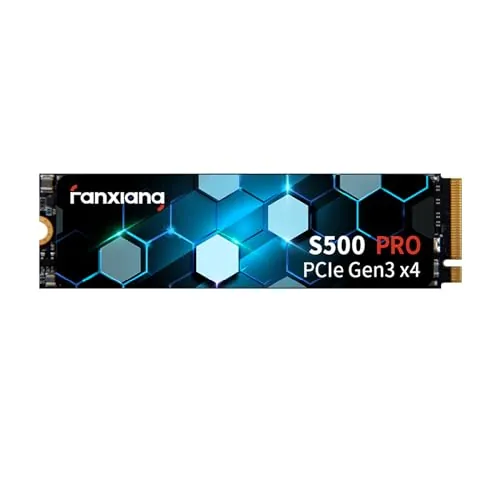
The fanxiang S101Q and S500 Pro are both 512GB internal SSDs, but they target different computer connections. The S500 Pro is the faster overall choice for a compatible M.2 NVMe system, while the S101Q is the practical alternative for computers that need a 2.5-inch SATA drive.
#1 Overall Winner
Contender
Choose the fanxiang S500 Pro for a compatible M.2 NVMe laptop or desktop where faster loading and file transfers matter. Choose the fanxiang S101Q when your computer uses a 2.5-inch SATA bay or you are replacing a conventional SATA hard drive. Do not select based on speed alone: interface compatibility decides which model can be installed.
Overall winner
Depends on your needs
| Feature | fanxiang S101Q 512GB SATA SSD | fanxiang S500 Pro 512GB NVMe SSD | Winner |
|---|---|---|---|
Overall assessment |
80 overall score |
82 overall score |
fanxiang S500 Pro 512GB NVMe SSD |
Interface and form factor |
2.5-inch SATA III |
M.2 2280 PCIe Gen3 x4 NVMe |
Depends |
Listed read speed |
Up to 560MB/s |
Up to 3200MB/s |
fanxiang S500 Pro 512GB NVMe SSD |
Listed write speed |
Up to 490MB/s |
Up to 1300MB/s |
fanxiang S500 Pro 512GB NVMe SSD |
Capacity |
512GB |
512GB |
Tie |
Performance score |
84 |
87 |
fanxiang S500 Pro 512GB NVMe SSD |
Setup score |
90 |
92 |
fanxiang S500 Pro 512GB NVMe SSD |
Compatibility score |
84 |
76 |
fanxiang S101Q 512GB SATA SSD |
Reliability score |
68 |
71 |
fanxiang S500 Pro 512GB NVMe SSD |
Included accessories |
Not specified |
Graphite sticker, screw, screwdriver |
fanxiang S500 Pro 512GB NVMe SSD |
Customer rating |
4.5/5 from 5,646 reviews |
4.6/5 from 6,028 reviews |
fanxiang S500 Pro 512GB NVMe SSD |
Service coverage |
Three-year service and lifetime technical support |
Three-year quality assurance |
Depends |
The S500 Pro is the clear performance leader on a compatible system. Its maximum listed read speed is 3200MB/s and its maximum listed write speed is 1300MB/s, compared with 560MB/s read and 490MB/s write for the S101Q. This should make the NVMe drive the more suitable choice for faster booting, program loading, game loading, saving, and large file transfers where the system supports PCIe NVMe.
The S101Q is still a meaningful upgrade over a mechanical hard drive, with reviews reporting faster boot times and revived older computers. Its performance is constrained by SATA rather than a deficiency in its intended role.
The S500 Pro wins speed decisively in the provided scores and listed specifications. Its up-to-3200MB/s read rating is substantially higher than the S101Q’s up-to-560MB/s rating, and its up-to-1300MB/s write rating also exceeds the S101Q’s up-to-490MB/s figure. Reviews for the S500 Pro mention quick loading and responsive use.
The S101Q remains quick for a SATA upgrade and has review reports of major improvements over failing or slow hard drives. Its speed is appropriate for SATA-based systems, but it cannot match an NVMe drive’s listed transfer capability.
The S500 Pro has a modest reliability-score advantage, but neither drive is free from cautionary feedback. Most supplied reviews report normal operation, with some users reporting months of use without issues. However, the S500 Pro has reports of a drive failing early or not initializing, while the S101Q has reports of early failure and a serious capacity-related complaint involving a separate 4TB variant.
These reports do not establish that every unit has a problem, but they make regular backups important for either model, especially for irreplaceable files.
Both products score strongly for usability, and review feedback for each repeatedly describes setup as simple. The S101Q can be especially convenient when swapping out an existing 2.5-inch hard drive. The S500 Pro is compact and includes installation hardware, but users must identify a compatible M.2 NVMe slot first.
The S500 Pro has a slight usability-score lead, reflecting its strong feedback for easy installation and responsive operation. In practice, the easier product is the one that matches the computer’s existing storage interface.
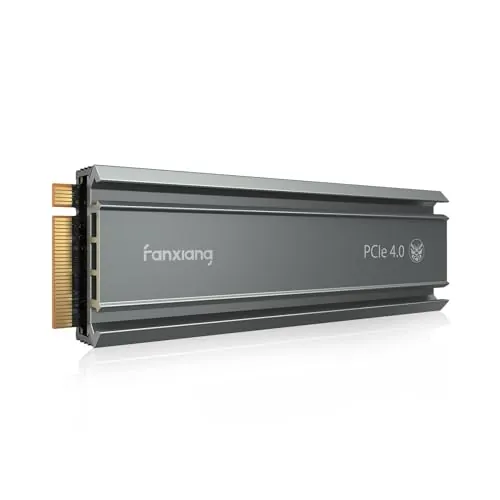
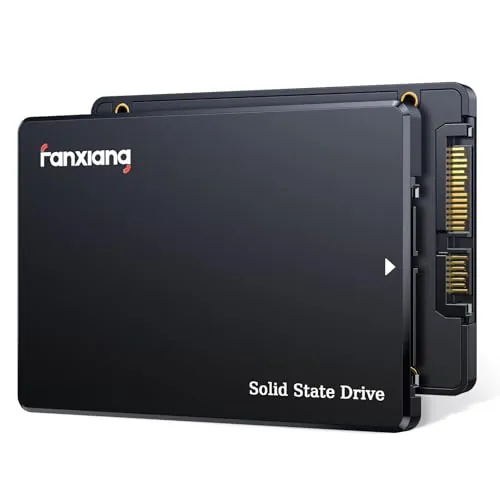
The drives have distinct physical designs rather than directly competing layouts. The S101Q is a 7mm-thick 2.5-inch drive designed for SATA bays, measuring 3.94 by 2.75 inches. The S500 Pro is a slim M.2 2280 module measuring 3.15 by 0.87 inches, making it the more compact option for an internal M.2 slot.
The S500 Pro has the higher design and portability scores, but the S101Q’s larger SATA format remains more practical for systems built around 2.5-inch storage.
The S101Q has a stated polycarbonate enclosure and a 2.5-inch form factor, while the S500 Pro is a much smaller M.2 board-style drive with a stated polycarbonate material and graphite heat-dissipation sticker. The S101Q holds a slightly higher build-quality score, although both sets of reviews include positive comments about perceived quality.
Neither product has enough supplied long-term evidence to make a firm hardware-longevity conclusion. Reports of failures exist for both, so build impressions should not replace a sound backup plan.
Both are solid-state drives with no internal mechanical mechanism and are described as shock resistant. The S500 Pro has a slightly higher durability score, specifies TLC NAND, lists up to 320TBW, and adds a graphite heat-dissipation sticker. The S101Q lists wear leveling, ECC, TRIM, and S.M.A.R.T. support intended to support stable drive operation.
Long-term durability cannot be determined conclusively from the supplied reviews, which include some failures for both models. The S500 Pro has a slight data-led edge, but sensible backup practices remain essential.
The S500 Pro is more compact and scores substantially higher for portability. Its M.2 2280 design is 0.08 inches thick and weighs 0.06 pounds, compared with the S101Q’s 2.5-inch, 0.28-inch-thick format and 1.6-ounce weight. Both are internal drives, so portability is usually secondary to fit.
The S101Q can also be used in a SATA-to-USB enclosure according to some review experiences, but that requires separate hardware. The S500 Pro may likewise be used externally only with an appropriate NVMe enclosure.
Both drives use 3D NAND and SLC cache technology, are shock resistant, and provide 512GB of storage. The S101Q lists a broader set of drive-management features, including garbage collection, wear leveling, RAID, ECC, TRIM, and S.M.A.R.T. The S500 Pro specifies TLC NAND, up to 320TBW, and a graphite heat-dissipation sticker.
The S500 Pro also lists a mounting screw and screwdriver in the package. The S101Q’s defining feature is its 2.5-inch SATA III format with backward compatibility to older SATA connections.
Setup feedback is positive for both SSDs. The S101Q is often described as a drop-in replacement for older hard drives, and reviewers mention straightforward installation and faster Windows installation. The S500 Pro includes a mounting screw and screwdriver, and reviewers describe it as plug and play or easy to install.
The S500 Pro earns the higher setup score, but its installation has an additional prerequisite: an available, compatible M.2 NVMe slot. For a 2.5-inch drive replacement, the S101Q may involve less physical adaptation.
The S101Q is better for broad legacy compatibility. It uses a standard 2.5-inch SATA interface, is backward compatible with SATA II and SATA, and is listed for Windows, Linux, and macOS. It is therefore the natural fit for many systems originally equipped with a 2.5-inch hard drive.
The S500 Pro is listed for Windows 7 through 11 and macOS 10.9 and later, but it requires a motherboard with an M.2 interface that supports its PCIe NVMe connection. Review feedback on compatibility is mixed for both, making a system-manual check important.
Connectivity is the main dividing line. The S101Q uses SATA III 6Gb/s and is stated to be backward compatible with SATA II and SATA, giving it an advantage for older computers. The S500 Pro uses PCIe Gen3 x4 NVMe 1.4 and requires an M.2 interface, delivering higher bandwidth but narrower hardware eligibility.
The S500 Pro has the higher connectivity score because of its faster interface, but the S101Q has the higher compatibility score. Confirm both the physical slot and protocol support; an M.2 slot does not automatically mean NVMe support.
Both products have favorable power-efficiency scores, with a small advantage for the S500 Pro. As solid-state drives, neither has moving parts. The supplied information does not provide measured power draw, standby consumption, or thermal test results, so a detailed energy-use comparison is not supported.
The S500 Pro’s graphite heat-dissipation sticker is intended to assist thermal control, while the S101Q emphasizes shock resistance and drive-management technologies rather than thermal hardware.
The S500 Pro has the higher value score because it combines much higher listed NVMe speeds, included installation accessories, strong customer satisfaction, and a three-year assurance period. This advantage matters only when its M.2 PCIe NVMe interface is usable.
The S101Q also scores well for value and can be the better practical purchase for a SATA-only computer, where the S500 Pro cannot be installed. Both have some reliability uncertainty in review feedback, so value should include the need to maintain backups rather than focusing solely on storage capacity or headline speed.
Both products are from fanxiang, so there is no brand-to-brand distinction. The S500 Pro has a slightly higher brand-trust score, while both drives have strong aggregate ratings and thousands of reviews. At the same time, the supplied review data includes isolated reports of failures for each model.
Fanxiang lists three-year coverage on both products. Buyers who prioritize established long-term support records should review the current retailer return terms and the manufacturer’s support process before purchase, as the supplied data does not provide a broader support-history comparison.
The S500 Pro leads customer satisfaction, with a 4.6/5 rating from 6,028 reviews and a higher customer-satisfaction score. Reviewers commonly praise fast operation, easy installation, and value. The S101Q also performs strongly, holding a 4.5/5 rating from 5,646 reviews, with recurring praise for easy installation, speed, and breathing new life into older PCs.
For both drives, a smaller set of reviews reports reliability or compatibility problems. The aggregate feedback favors the S500 Pro slightly, but neither result removes the need to check system compatibility.
Both drives list three years of coverage. The S101Q states three years of after-sales service plus lifetime technical support. The S500 Pro states a three-year quality-assurance service. Their warranty-support scores are equal, and the supplied material does not include details on returns, replacement timing, or regional terms.
Before purchase, confirm the seller’s current return policy and retain order and drive-identification information in case support is needed.
The fanxiang S500 Pro 512GB NVMe SSD is the better overall option based on the provided scores and specifications. It delivers a meaningful advantage in listed read and write speeds, and it also leads in performance, speed, setup, value, and customer satisfaction. For an M.2 PCIe NVMe-capable laptop or desktop, it is the logical choice when faster system loading and file transfers are priorities.
The fanxiang S101Q remains the right answer for a different hardware situation: a computer with a 2.5-inch SATA bay. It is designed for straightforward SATA upgrades, has stronger compatibility scoring, and receives positive feedback for restoring responsiveness to older computers. Neither model is immune to isolated reports of early failure or compatibility problems. Verify fit before purchase, keep important files backed up, and select the interface your system actually supports rather than choosing solely by the higher speed rating.
Overall winner
Depends on your needs
The fanxiang S500 Pro is the stronger overall option in the provided scoring, helped by higher performance, speed, usability, value, and customer-satisfaction results. Its advantage applies only to systems with a compatible M.2 PCIe NVMe slot. The S101Q is the more suitable choice when upgrading a computer that needs a 2.5-inch SATA drive.
Yes. The S500 Pro is rated for up to 3200MB/s reads and 1300MB/s writes, while the S101Q is rated for up to 560MB/s reads and 490MB/s writes. The difference comes from the S500 Pro’s PCIe Gen3 x4 NVMe interface compared with the S101Q’s SATA III connection.
Not directly. The S500 Pro is an M.2 2280 NVMe SSD and needs a compatible M.2 PCIe/NVMe slot on the motherboard. For a computer with only a 2.5-inch SATA bay, the S101Q is the appropriate physical and interface match. Check the system manual before ordering either drive.
Both products score well for setup, and reviews for both commonly describe installation as straightforward. The S101Q is practical for a conventional 2.5-inch SATA replacement. The S500 Pro includes a screw and screwdriver, but installation still depends on locating an available M.2 slot and confirming that it supports NVMe.
The fanxiang S101Q is usually the better fit for an older computer if it has a 2.5-inch SATA bay. Its product information also states backward compatibility with SATA II and SATA interfaces. The S500 Pro can be preferable only if the older system specifically has a compatible M.2 PCIe NVMe slot.
Yes, although most supplied review feedback is positive. The S101Q has reports of some early failures and a capacity-related complaint involving another capacity variant. The S500 Pro also has reports of early failure or inability to initialize. Important files should be backed up regardless of which SSD is selected.
For a PC with an M.2 NVMe slot, the S500 Pro has the higher value score and provides substantially higher listed transfer speeds, plus included mounting accessories. The S101Q remains a sensible value choice where SATA is the required interface, because NVMe performance cannot be used without compatible hardware.
Check our rankings and expert guides to find the best electronics products for your goals.