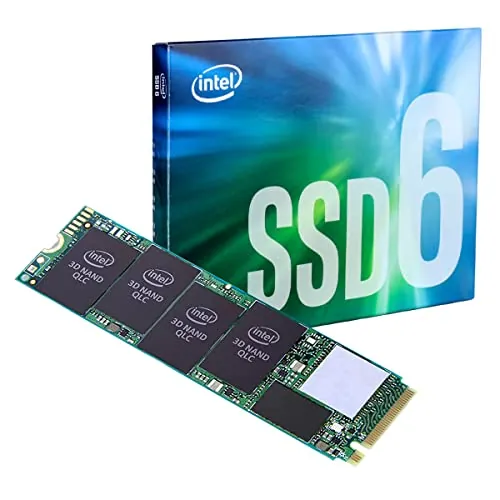
#1 Overall Winner
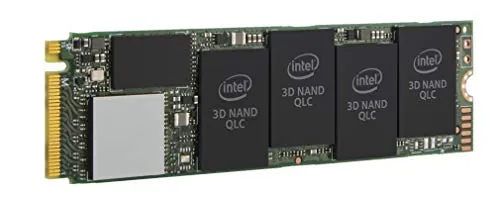
Intel 660p Series 1TB NVMe SSD
- 1TB capacity provides substantially more room for games, applications, media and general files.
Comparison
The Intel 660p and Kingston Q500 target different upgrade paths: the Intel is a 1TB M.2 NVMe SSD, while the Kingston is a 240GB 2.5-inch SATA SSD. Choose the Intel for compatible systems needing more capacity and higher rated transfer speeds; choose the Kingston for a SATA-based upgrade with stronger supplied reliability and support scores.
#1 Overall Winner
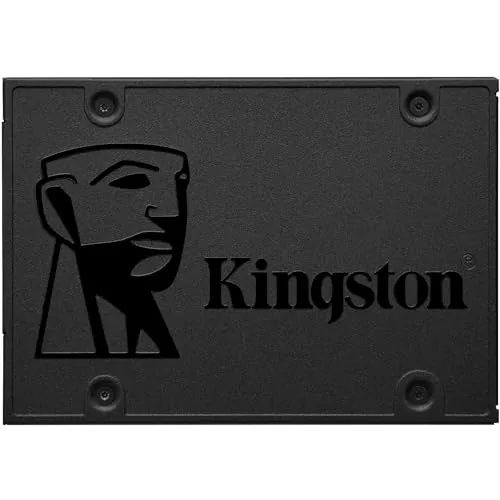
Contender
Choose the Intel 660p if your computer supports M.2 2280 NVMe and you need 1TB for games, applications or general storage. Choose the Kingston Q500 if you need a 2.5-inch SATA drive for an older PC or laptop and place more weight on the supplied reliability and support scores. Avoid using the Intel as a frequent, sustained heavy-write drive if that is your primary workload.
Overall winner
Depends on your needs
| Feature | Intel 660p Series 1TB NVMe SSD | Kingston Q500 240GB SATA SSD | Winner |
|---|---|---|---|
Overall assessment |
Overall score: 78 |
Overall score: 86 |
Kingston Q500 240GB SATA SSD |
Capacity |
1TB |
240GB |
Intel 660p Series 1TB NVMe SSD |
Form factor |
M.2 2280 |
2.5-inch |
Depends |
Interface |
PCIe NVMe 3.0 x4 |
SATA |
Depends |
Listed sequential speed |
Up to 1800MB/s read and write |
500MB/s read |
Intel 660p Series 1TB NVMe SSD |
NAND type |
QLC 3D NAND |
TLC |
Kingston Q500 240GB SATA SSD |
Large sustained writes |
May slow after SLC cache is exhausted |
Basic SATA performance; small-file copies may slow |
Depends |
Reliability |
Mixed review feedback; score 69 |
Consistently stable review feedback; score 88 |
Kingston Q500 240GB SATA SSD |
Durability |
Score 65 |
Score 77 |
Kingston Q500 240GB SATA SSD |
Compatibility |
M.2 2280 PCIe-compatible systems |
2.5-inch SATA-compatible systems |
Kingston Q500 240GB SATA SSD |
Setup |
Score 86 |
Score 81 |
Intel 660p Series 1TB NVMe SSD |
Value |
Score 87 |
Score 84 |
Intel 660p Series 1TB NVMe SSD |
Customer satisfaction |
4.8/5 from 2,737 reviews |
4.6/5 from 9,746 reviews |
Kingston Q500 240GB SATA SSD |
Warranty support |
Score 52 |
Score 78 |
Kingston Q500 240GB SATA SSD |
The Intel 660p has the stronger peak performance profile on paper, with PCIe NVMe 3.0 x4 connectivity and rated sequential read and write speeds up to 1800MB/s. The Kingston Q500 is limited by its SATA interface and lists a 500MB/s read speed, although this remains a meaningful improvement over a mechanical hard disk for daily use. The supplied performance score favours Kingston, reflecting its strong everyday results, but Intel is the better fit for workloads that benefit from higher sequential transfer rates. For sustained heavy writes, Intel reviews caution that performance can fall sharply once its SLC cache is full.
The Intel's listed speed ceiling is much higher: up to 1800MB/s sequential reads and writes versus Kingston's listed 500MB/s read speed. Reviews show that the Intel can be quick for normal-sized transfers and read-focused tasks, but its QLC cache behaviour can reduce speed during large or frequent writes. Kingston cannot match NVMe throughput, yet its supplied speed score is higher and review feedback consistently describes it as fast for ordinary laptop and PC upgrades.
Kingston has the clearer advantage in the supplied reliability data, scoring 88 compared with 69 for Intel. Q500 reviews consistently describe stable, problem-free use for routine upgrades. Intel reviews are often positive, but also raise concerns around QLC write endurance, cache-related slowdowns and occasional heat; the aggregated overview notes mixed reliability reports. For a light SATA upgrade where consistency is the priority, the evidence favours Kingston.
Both drives are designed for internal installation and have positive setup feedback. Intel reviews describe a simple install process followed by partitioning and formatting in Windows, provided the motherboard has the correct M-key M.2 slot. Kingston's 2.5-inch SATA layout is familiar for many older computers, though internal installation requires SATA data and power connections. Intel has the higher supplied usability and setup scores, but the easier physical installation is ultimately determined by the existing computer.
The Intel 660p's M.2 2280 design is compact and cable-free when installed in a compatible motherboard slot. The Kingston Q500's 2.5-inch design is better suited to computers built around SATA bays, including many older laptops and desktops. Neither form factor is inherently better: Intel is preferable for M.2 NVMe-equipped systems, while Kingston is preferable where a 2.5-inch SATA mounting location and connections are available.
The two drives use different physical designs rather than directly comparable enclosures. Intel is a bare M.2 2280 module intended to mount directly to the motherboard, while Kingston is a 2.5-inch SSD specified as shock resistant. Both receive the same supplied build-quality score. Intel review feedback is divided on operating temperatures and some users recommend a heatsink in demanding environments; the provided Kingston feedback describes low heat in light use.
The Kingston Q500 has the higher supplied durability score and uses TLC storage, while the Intel 660p uses QLC NAND. Intel reviews specifically advise against frequent heavy-write workloads and identify lower endurance as a trade-off for capacity and cost. Kingston is specified as shock resistant and has more favourable long-term stability feedback in the provided information. Neither drive should be evaluated beyond its stated intended workload and capacity requirements.
The Intel's M.2 module is physically smaller and is specified at 0.1 pounds, while the Kingston is a 41g 2.5-inch drive. Kingston has the higher supplied portability score, but portability has limited importance once either SSD is installed internally. For external use, both would require a compatible enclosure or adapter, and the Intel would require an NVMe M.2 enclosure while Kingston would require a 2.5-inch SATA enclosure.
Intel's principal feature advantages are the M.2 2280 NVMe form factor, 1TB capacity and PCIe bandwidth. Kingston's feature set is more basic: a 2.5-inch SATA SSD with 240GB capacity and shock resistance. Neither product is presented with smart functions or advanced software features in the supplied data. The decision is primarily between a higher-capacity NVMe storage configuration and a simpler SATA replacement drive.
The Intel leads the supplied setup score. Reviews describe shutting down the PC, inserting the M.2 module, securing it, then initializing and formatting it in Windows. Kingston's installation is also conventional, but may involve fitting the 2.5-inch drive into a bay or bracket and connecting SATA power and data cables; one review notes that mounting screws were not included. In either case, back up important data and confirm the required mounting hardware before beginning.
Kingston has the higher compatibility score, but compatibility is not interchangeable. The Q500 fits systems with a 2.5-inch SATA bay or suitable SATA connection, making it a natural upgrade for many legacy laptops and desktops. The Intel fits PCs, laptops, servers and arrays that accept M.2 2280 PCIe drives. Buyers must check whether their system supports SATA, M.2 SATA, or M.2 PCIe/NVMe, as M.2 physical fit alone does not establish NVMe support.
Connectivity is the decisive difference. The Intel uses PCIe NVMe 3.0 x4 and requires an M.2 2280 PCIe-capable slot. The Kingston uses SATA and lists support for SATA 3.0Gb/s and SATA 6.0Gb/s, requiring SATA data and power connections. Intel has the higher supplied connectivity score because NVMe provides greater bandwidth, but Kingston has a broader practical fit for systems built around 2.5-inch SATA storage.
Both drives receive solid supplied power-efficiency scores, with Kingston slightly ahead. The Intel's review feedback includes isolated comments about heat and one report of marginally higher battery use in a specific older laptop setup, while Kingston feedback describes low heat under extended light use. The provided data does not offer comparable measured power-consumption figures, so neither drive can be declared decisively more efficient beyond the score difference.
The Intel has the higher supplied value score because it combines 1TB capacity, NVMe connectivity and high rated sequential speeds. It is especially compelling where a compatible system needs substantial storage for games or files. Kingston remains a credible value option for a specific job: converting a SATA-based PC or laptop from a hard drive to SSD storage with strong reliability feedback. Capacity and interface support matter more here than purchase price alone, because the two drives serve notably different storage needs.
Kingston has the higher supplied brand-trust score, alongside stronger reliability and warranty-support assessments. Intel remains a recognised brand in the provided data and receives positive review feedback for value and compatibility, but its score interpretation identifies more uncertainty around long-term reliability and QLC endurance. Buyers who prioritise the supplied brand and support signals should lean toward Kingston; those prioritising Intel's 1TB NVMe specification should assess workload suitability carefully.
Both products have strong customer ratings: Intel is rated 4.8/5 from 2,737 reviews, while Kingston is rated 4.6/5 from 9,746 reviews. The Kingston nevertheless has the higher supplied customer-satisfaction score, supported by a much larger review count and consistently positive comments about everyday speed and stability. Intel customers especially praise capacity, installation ease and value, but feedback is more divided on heat, reliability and demanding write behaviour.
The Kingston has a substantially higher supplied warranty-support score. One provided Q500 review refers to a three-year warranty, while the Intel product data only lists warranty as included without clear terms. Because the supplied information does not provide directly comparable official coverage details for both products, buyers should verify current warranty duration, coverage conditions and seller return terms before purchasing.
The Kingston Q500 240GB is the better overall option in the supplied scoring, thanks to its lead in overall assessment, reliability, durability, compatibility, customer satisfaction and warranty support. It is the safer recommendation for a straightforward 2.5-inch SATA upgrade where 240GB is sufficient and stable everyday performance is the goal.
However, the Intel 660p 1TB is the more useful drive for many compatible NVMe buyers. It offers four times the capacity and much higher listed sequential speeds, making it better suited to game libraries, larger application collections and general file storage. Its compromise is QLC behaviour: review evidence indicates that sustained large writes can slow once the cache is exhausted, and long-term feedback is less uniform. Select by interface first, then capacity and workload, rather than treating these two SSDs as identical alternatives.
Overall winner
Depends on your needs
The supplied overall score favours the Kingston Q500, largely because it scores better for reliability, compatibility, customer satisfaction and warranty support. However, the Intel 660p is the more capable choice for a compatible NVMe system needing 1TB capacity and higher rated sequential speeds. The better purchase therefore depends strongly on interface support and storage needs.
On their listed sequential specifications, yes. The Intel 660p uses PCIe NVMe 3.0 x4 and is rated up to 1800MB/s for sequential reads and writes, while the Kingston Q500 is a SATA SSD with a listed 500MB/s read speed. The Intel can slow substantially on very large sustained writes after its cache is filled.
The Intel 660p offers 1TB, compared with 240GB for the Kingston Q500. That makes the Intel more practical for larger game libraries, media collections and general file storage. The Kingston's capacity can suit an operating system, core applications and light everyday storage, but buyers should confirm that 240GB is enough before choosing it.
The Kingston Q500 is usually the more direct fit when an older laptop has a 2.5-inch SATA bay, because it uses the standard 2.5-inch SATA format. The Intel 660p only fits systems with an M.2 2280 PCIe/NVMe slot. Check the laptop manual for its physical slot type and supported interface before buying either drive.
Yes, provided the system has a compatible M.2 NVMe slot. Reviews frequently identify game storage as a suitable use case, and the 1TB capacity is much more accommodating than 240GB. Its QLC design is less ideal for repeated very large writes, but game libraries are generally a more read-focused workload according to the supplied review feedback.
The Kingston Q500 has the higher supplied reliability score, and its reviews repeatedly describe stable, trouble-free everyday operation. The Intel 660p has mixed long-term reliability feedback, with its score interpretation identifying QLC endurance and reports of possible heat as limitations. This does not mean every Intel drive will fail, but Kingston has the stronger evidence in this comparison.
Both are internal drives with strong setup scores. The Intel is simple where an accessible M.2 2280 NVMe slot is available: it mounts with a small retaining screw and then needs to be initialized or formatted. The Kingston is straightforward in a compatible 2.5-inch SATA system, but requires appropriate SATA power and data connections.
The provided data points toward Kingston for durability and reliability, and the Q500 is specified with TLC while the Intel uses QLC. Intel review feedback specifically warns that the 660p is less appropriate for heavy, frequent writes and has lower endurance considerations. Exact endurance results vary by workload, so neither drive should be selected without considering intended write volume.
Check our rankings and expert guides to find the best electronics products for your goals.