#1 Overall Winner
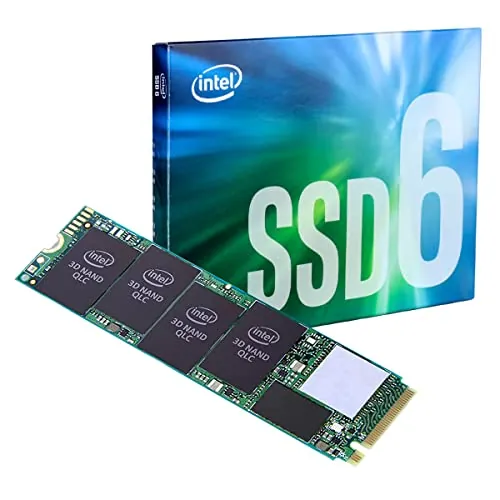
Intel 660p Series M.2 2280 2TB
- 2TB capacity provides substantially more room for games, media, applications, and archives.
Comparison
The Intel 660p and Kingston Q500 serve different upgrade paths: Intel offers 2TB of M.2 NVMe storage and higher rated sequential speeds, while Kingston is a compact 240GB 2.5-inch SATA drive with stronger reliability and compatibility scoring. Choose Intel for capacity-heavy, read-focused storage in a compatible system; choose Kingston for a straightforward SATA upgrade and stable everyday use.
#1 Overall Winner
Contender
Choose the Intel 660p for 2TB of storage, M.2 NVMe compatibility, and game or media libraries that are mostly read-focused. Choose the Kingston Q500 for a simple 2.5-inch SATA laptop or desktop upgrade, modest storage needs, and stronger provided reliability results.
Overall winner
Depends on your needs
| Feature | Intel 660p Series M.2 2280 2TB | Kingston 240GB Q500 SATA3 2.5 SSD | Winner |
|---|---|---|---|
Overall assessment |
Strong value and capacity |
Higher overall score |
Kingston 240GB Q500 SATA3 2.5 SSD |
Capacity |
2TB |
240GB |
Intel 660p Series M.2 2280 2TB |
Interface |
PCIe NVMe 3.0 x4 |
SATA |
Intel 660p Series M.2 2280 2TB |
Form factor |
M.2 2280 |
2.5-inch |
Depends |
Rated sequential speed |
Up to 1,800 MB/s read/write |
Up to 500 MB/s read |
Intel 660p Series M.2 2280 2TB |
NAND type |
QLC 3D NAND |
TLC |
Depends |
Sustained writes |
Can slow after cache fills |
Basic SATA performance |
Kingston 240GB Q500 SATA3 2.5 SSD |
Reliability |
Mixed feedback |
Strong provided score |
Kingston 240GB Q500 SATA3 2.5 SSD |
Compatibility |
Requires M.2 PCIe NVMe support |
2.5-inch SATA systems |
Kingston 240GB Q500 SATA3 2.5 SSD |
Value |
Very strong for high-capacity NVMe storage |
Strong for a basic SATA upgrade |
Intel 660p Series M.2 2280 2TB |
Customer satisfaction |
4.8/5 from 2,737 reviews |
4.6/5 from 9,746 reviews |
Depends |
Setup |
Easy if slot is compatible |
Simple SATA installation |
Intel 660p Series M.2 2280 2TB |
Intel has the higher interface bandwidth and higher stated sequential rating, reaching up to 1,800 MB/s for reads and writes against Kingston’s stated 500 MB/s read speed. In ordinary read-focused storage and game loading, Intel reviews are positive. However, its QLC design can slow significantly on sustained large writes after the cache is filled. Kingston cannot match the Intel’s peak NVMe rating, but its provided performance and reliability assessments indicate a more consistently suitable choice for light, everyday SATA workloads.
Intel is rated for up to 1,800 MB/s sequential reads and writes, compared with Kingston’s up-to-500 MB/s stated read speed. Its speed advantage is clearest in compatible NVMe systems and shorter or read-focused transfers. Reviews caution that Intel can become much slower during very large, frequent writes once its cache is full. Kingston is slower by interface design but earns the higher provided speed score for its intended everyday SATA role.
Kingston is the stronger choice for reliability based on the provided scoring and review pattern. Its users commonly report stable daily operation, while Intel’s review summary includes mixed reports about longevity and heat. Intel remains well regarded for its intended storage use, but the QLC NAND design and sustained-write behavior make workload matching especially important.
Both drives are described as easy to install when the system is compatible. Intel installation requires checking for an M-key M.2 PCIe/NVMe slot, then initializing and formatting the drive if needed. Kingston follows the familiar 2.5-inch SATA installation path, which is often more accessible in older laptops and desktops. Kingston has a slightly stronger usability score, while Intel has the slightly stronger setup score.
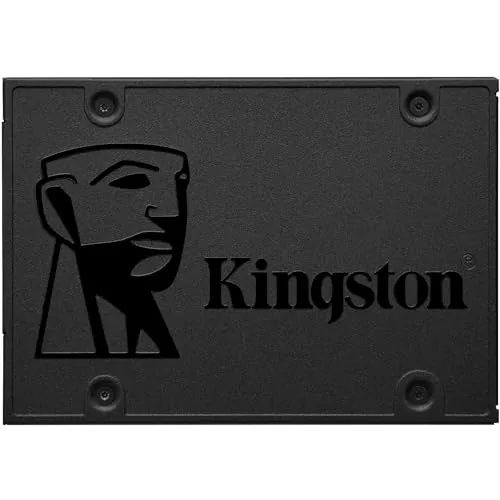
The design difference is principally physical. Intel uses the slim M.2 2280 card format, which installs directly on a compatible motherboard or laptop slot and avoids SATA data and power cables. Kingston uses a 2.5-inch, 7 mm-class SATA drive format that fits systems designed for conventional laptop-sized drives. Neither format is inherently better; system compatibility decides the appropriate design.
Both are compact internal solid-state drives without moving parts. Kingston is specified as shock resistant and receives a slightly lower build-quality score than Intel, but it has the stronger reliability result. Intel’s hardware is compact and suited to an M.2 slot, though some reviews mention heat under heavier operation and suggest a heatsink in applicable installations.
Kingston has the higher provided durability score and uses TLC storage, while Intel’s supplied assessment identifies QLC endurance as a limitation. Intel reviews generally consider it adequate for normal, read-heavy use, but caution against frequent heavy writes. Kingston’s shock-resistant specification and positive long-term daily-use comments support its advantage for a modest SATA upgrade, although no direct lifetime comparison should be inferred from the supplied information.
Both drives are lightweight internal components rather than standalone portable storage products. Intel’s M.2 2280 board is smaller and lighter, while Kingston’s 2.5-inch enclosure is physically larger but remains compact. Intel is preferable where internal space and cable reduction matter; Kingston is suitable where a 2.5-inch bay is already available.
The Intel 660p’s defining features are its 2TB capacity, M.2 2280 footprint, PCIe NVMe 3.0 x4 connection, and QLC-based value proposition. Kingston’s Q500 is a simpler 240GB 2.5-inch SATA drive with shock resistance and TLC storage. Intel offers more capability where a compatible NVMe slot is available; Kingston is less feature-rich but better suited to standard SATA replacement duties.
Intel reviews describe a simple physical installation followed by drive initialization and formatting, provided that the motherboard has the correct M-key M.2 slot. Kingston’s 2.5-inch SATA format is also straightforward, though buyers may need their own mounting screws depending on the system. Intel has the higher setup score, but Kingston’s familiar SATA fit can make it simpler for an older-PC refresh.
Kingston wins on broad compatibility because it uses the established 2.5-inch SATA format and receives the higher compatibility score. Intel works with compatible M.2 2280 PCIe drives and can also work through adapters in some reported setups, but buyers must verify slot keying, PCIe lane support, firmware behavior, and physical clearance. The Intel is not a drop-in substitute for a 2.5-inch SATA drive bay.
Intel has the technical connectivity advantage through PCIe NVMe 3.0 x4, but it requires specific M.2 PCIe/NVMe support. Kingston uses SATA 3.0 Gb/s and SATA 6.0 Gb/s connectivity and has the stronger provided compatibility score. For a modern compatible NVMe slot, Intel is the higher-bandwidth option. For a standard 2.5-inch SATA bay, Kingston is the direct fit.
Both products receive solid provided power-efficiency scores, with Kingston slightly ahead. One Intel review noted marginally higher battery use in an older laptop installation, while another discussed heat under demanding use. These isolated reports should not be treated as a universal battery-life measurement. For either drive, system configuration and workload will influence power use.
Intel has the stronger value score because it combines 2TB capacity with NVMe connectivity and high rated sequential speeds. That value is strongest for buyers who will use the capacity for games, media, and read-focused data. Kingston still offers sound value for a specific task: bringing SSD responsiveness to a SATA-equipped system with modest storage needs. Its lower capacity means it is not an equivalent substitute for a large library drive.
Both Intel and Kingston receive strong brand-trust scores, with Kingston slightly ahead in the provided data. Intel’s reviews value the recognized brand alongside its capacity-focused offering. Kingston’s stable-operation feedback, high review count, and stronger reliability assessment support buyer confidence for a conventional SATA upgrade. The provided data does not establish a detailed comparison of support policies or update practices.
Both drives perform strongly with buyers. Intel is rated 4.8/5 from 2,737 reviews and is frequently praised for value, capacity, easy installation, and game-storage performance. Kingston is rated 4.6/5 from 9,746 reviews and earns a slightly higher customer-satisfaction score, with repeated comments about dependable operation and effective laptop upgrades. Intel has the higher star average; Kingston has the larger review sample.
Kingston has a provided warranty-support score, while no corresponding score is available for Intel. One Kingston review mentions a three-year warranty, but warranty terms can vary by seller, territory, and product listing. Confirm the exact warranty and return coverage with the seller before purchasing either SSD.
The Kingston Q500 is the better overall choice according to the provided scores, particularly for reliability, compatibility, and customer satisfaction. It is the sensible option for a basic 2.5-inch SATA upgrade where stable daily performance matters more than peak throughput or large capacity.
However, the Intel 660p is the more compelling product for the right system and workload. Its 2TB capacity is dramatically larger, and its PCIe NVMe interface carries a much higher stated sequential speed rating. It is especially well suited to game libraries, media storage, and other predominantly read-focused uses. Its QLC design, cache-related sustained-write slowdowns, and mixed heat and reliability feedback mean it should be selected deliberately rather than as a universal performance drive. Verify interface compatibility first: these SSDs are not interchangeable physically or electrically.
Overall winner
Depends on your needs
The Kingston Q500 has the higher overall score, driven by stronger reliability, compatibility, and customer-satisfaction results. However, the Intel 660p is the more practical choice when 2TB capacity and NVMe-class rated transfer speeds matter. The better option depends primarily on whether your system supports M.2 NVMe and how much storage you need.
The Intel 660p has the higher stated sequential speed, rated up to 1,800 MB/s for reads and writes, versus the Kingston Q500's stated read speed of up to 500 MB/s. Review feedback also notes that the Intel can slow substantially during large sustained writes after its cache is filled, while Kingston is a basic SATA model.
The Intel 660p offers 2TB, compared with 240GB on the Kingston Q500. That difference makes the Intel much better suited to large game libraries, extensive media collections, and archive storage. The Kingston capacity can be adequate for a light operating-system and application upgrade, but buyers should check their required free space before choosing it.
Yes. Reviews repeatedly identify the Intel 660p as a strong fit for game storage because of its large 2TB capacity, fast read-focused performance, and NVMe interface. It is less appropriate for workloads involving frequent very large writes, as reviewers report reduced performance after the SLC cache is exhausted.
The Kingston Q500 is generally the simpler choice for an older laptop that has a standard 2.5-inch SATA bay. Its SATA interface is broadly compatible, and reviews describe effective everyday laptop upgrades. Choose the Intel only if the laptop supports an M.2 2280 PCIe NVMe drive or you have confirmed an appropriate compatible adapter.
The Kingston Q500 has the stronger reliability score, and its reviews consistently describe stable, problem-free daily operation. The Intel 660p has positive overall feedback, but its supplied review summary notes mixed reliability opinions alongside concerns about QLC endurance and heat. Neither product's warranty terms should be assumed beyond the provided information.
Check our rankings and expert guides to find the best electronics products for your goals.