ElectronicsRanker
Menu
INLAND Professional 120GB SSD vs Intel 660p 1TB Comparison

Comparison

INLAND Professional 120GB SSD vs Intel 660p 1TB Comparison

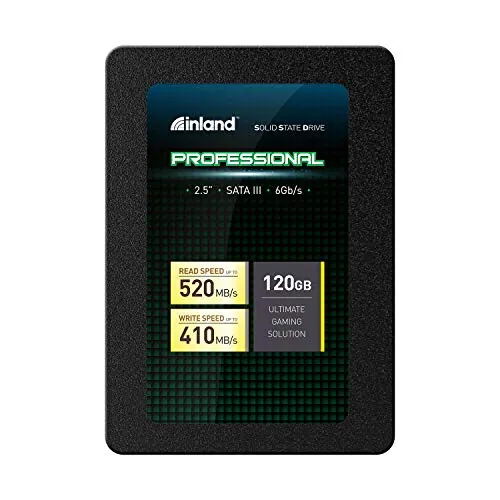
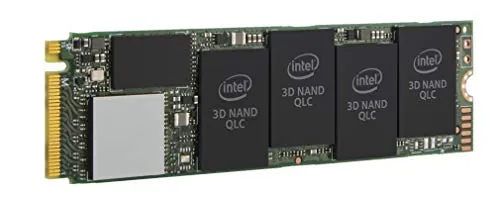
The INLAND Professional 120GB is a compact 2.5-inch SATA SSD aimed at inexpensive upgrades for compatible older PCs and laptops. The Intel 660p pairs a 1TB M.2 NVMe design with much higher rated throughput and stronger overall results, making it the better choice for compatible systems that need more capacity; the INLAND is the practical alternative for SATA-only hardware.

Expert tested Data driven Unbiased reviews Updated 2 August 2026
INLAND Professional 120GB SSD

#1 Overall Winner

INLAND Professional 120GB SSD

72/100
  • 2.5-inch SATA format suits many older desktops and laptops.
View review
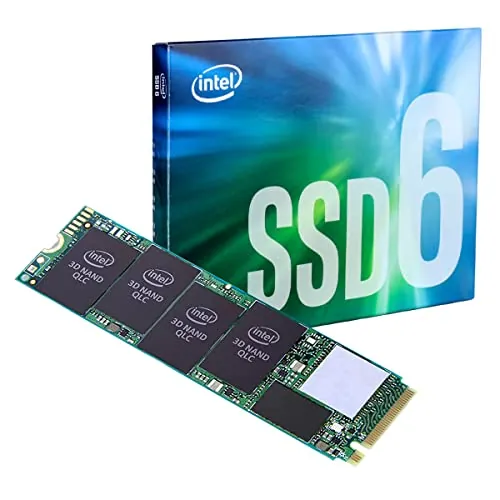
Intel 660p Series 1TB NVMe SSD

Contender

Intel 660p Series 1TB NVMe SSD

78/100
  • 1TB capacity provides substantially more room for applications, games, and files.
View review

Quick verdict

Choose the Intel 660p 1TB if your device has an M.2 2280 PCIe/NVMe slot and you want much more storage with faster rated peak speeds. Choose the INLAND Professional 120GB if you need a 2.5-inch SATA replacement for an older computer and want an affordable basic upgrade. Check the interface first: these drives are not physically or electrically interchangeable.

Overall winner

Depends on your needs

At-a-glance comparison

Feature INLAND Professional 120GB SSD Intel 660p Series 1TB NVMe SSD Winner

Overall position

Smaller SATA upgrade option

Higher-scoring 1TB NVMe option

Intel 660p Series 1TB NVMe SSD

Capacity

120GB

1TB

Intel 660p Series 1TB NVMe SSD

Form factor

2.5-inch, 7mm

M.2 2280

Depends

Interface

SATA III 6Gb/s

PCIe NVMe 3.0 x4

Intel 660p Series 1TB NVMe SSD

Rated sequential read

Up to 520MB/s

Up to 1,800MB/s

Intel 660p Series 1TB NVMe SSD

Rated sequential write

Up to 410MB/s

Up to 1,800MB/s

Intel 660p Series 1TB NVMe SSD

NAND type

3D TLC NAND

3D QLC NAND with SLC cache

Depends

Everyday installation

Easy-install feedback

Easy-install feedback

Tie

Compatibility

SATA desktops and laptops; mixed Windows recognition feedback

Compatible M.2 PCIe systems

Intel 660p Series 1TB NVMe SSD

Reliability feedback

Early-failure and freeze reports

Mixed longevity reports

Intel 660p Series 1TB NVMe SSD

Customer feedback

4.6/5 from 4,669 reviews

4.8/5 from 2,737 reviews

Intel 660p Series 1TB NVMe SSD

Warranty information provided

Three-year limited parts and labor warranty

No term stated in provided data

INLAND Professional 120GB SSD

Detailed comparison

Performance

The Intel 660p has the stronger peak performance profile. Its PCIe NVMe 3.0 x4 interface and stated 1,800MB/s sequential read and write ratings exceed the INLAND's stated 520MB/s read and 410MB/s write ratings. This makes the Intel better positioned for fast loading and general transfers on a properly supported system.

However, peak figures do not describe every workload. Intel reviews consistently note that large or sustained writes can slow after the SLC cache fills. The INLAND is slower on paper but is presented as a straightforward SATA upgrade that makes older systems feel more responsive. For basic use, both can improve substantially on mechanical storage; for capacity and higher short-burst throughput, Intel leads.

Speed

The Intel has a higher stated ceiling for sequential speed, at up to 1,800MB/s for reads and writes, while the INLAND is rated up to 520MB/s reads and 410MB/s writes. In a compatible PCIe NVMe system, the Intel should therefore have a substantial advantage in speed-oriented tasks.

The provided speed result is nonetheless slightly higher for the INLAND. That aligns with the caveat in Intel feedback: its QLC drive can lose write speed after its SLC cache is exhausted, particularly in large sustained transfers. For predictable light SATA upgrades, the INLAND is adequate; for higher peak throughput and faster read-focused storage, Intel is the stronger choice.

Reliability

Neither drive has unqualified reliability feedback. The INLAND has a lower reliability result, with aggregated reviews mentioning failures within three months for some buyers, plus mixed compatibility and Windows 10 recognition reports. Other users describe months or years of satisfactory use, so experiences are not uniform.

The Intel scores somewhat higher for reliability, but reviewers also mention QLC endurance limits, reports that it may not last, and workload-related performance concerns. Its reliability case is strongest for general, read-focused use rather than constant heavy writing. Maintain backups with either SSD, especially when storing important files.

INLAND Professional 120GB SSD

Pros

  • 2.5-inch SATA format suits many older desktops and laptops.
  • Rated sequential reads up to 520MB/s and writes up to 410MB/s.
  • 3D TLC NAND and shock-resistant construction.
  • Easy-install feedback and strong suitability as an operating-system boot drive.
  • Low-cost upgrade path from a mechanical hard drive.
  • Includes a three-year limited parts and labor warranty.

Cons

  • 120GB capacity is restrictive for large game libraries, media collections, and extensive application installs.
  • SATA performance is lower than the Intel drive's rated NVMe throughput.
  • Customer feedback includes early failures and occasional freezes.
  • Some buyers report that Windows 10 did not recognize the drive.
  • Reviews position it as less suitable for sustained, write-intensive work.
  • Brand-trust and reliability results are comparatively modest.
INLAND Professional 120GB SSD

Intel 660p Series 1TB NVMe SSD

Pros

  • 1TB capacity provides substantially more room for applications, games, and files.
  • PCIe NVMe 3.0 x4 interface with rated sequential reads and writes up to 1,800MB/s.
  • M.2 2280 format reduces cable clutter in compatible systems.
  • Strong review feedback for boot-drive use, storage capacity, and installation.
  • Higher connectivity, compatibility, value, brand-trust, and customer-satisfaction results.
  • QLC design and SLC cache can deliver fast results for lighter or intermittent writes.

Cons

  • Requires a compatible M.2 2280 PCIe/NVMe slot; it is not a drop-in replacement for a 2.5-inch SATA drive.
  • QLC NAND is a weaker fit for frequent heavy writes than read-focused storage workloads.
  • Write speed can fall substantially after the SLC cache is exhausted.
  • Some reviews report heat concerns, while others report cool operation under a heatsink.
  • Reliability feedback is mixed, including concerns about long-term life.
  • The provided data does not state a warranty term.
Intel 660p Series 1TB NVMe SSD

Final verdict

The Intel 660p Series 1TB is the best overall choice in this comparison for a compatible M.2 NVMe system. It has the higher overall result, eight times the capacity, much higher stated sequential transfer ratings, and stronger results for compatibility, value, brand trust, and customer satisfaction. It is especially compelling for general storage, game libraries, and everyday use where reads are common.

The INLAND Professional 120GB should not be dismissed: it is the more appropriate option for computers that need a 2.5-inch SATA drive, particularly older systems being upgraded from a hard disk. Its TLC NAND, simple SATA format, and stated three-year limited warranty are practical benefits. The deciding factor is interface compatibility first, then capacity needs and write workload. Neither drive is the strongest choice for repeated sustained heavy writing, and both warrant a reliable backup routine.

Overall winner

Depends on your needs

Frequently asked questions

<p>Which is better overall: the INLAND Professional 120GB SSD or Intel 660p 1TB?</p>

The Intel 660p is the stronger overall option in the provided scoring because it combines 1TB capacity, a PCIe NVMe interface, higher rated sequential throughput, stronger compatibility results, and higher customer satisfaction. The INLAND remains the more relevant choice only when a system requires a 2.5-inch SATA drive and 120GB is enough.

<p>Is the Intel 660p faster than the INLAND Professional SSD?</p>

On their stated sequential ratings, the Intel 660p is substantially faster: up to 1,800MB/s for both reads and writes, compared with up to 520MB/s reads and 410MB/s writes for the INLAND. Actual results still depend on the system, interface support, workload, and, for the Intel, whether its SLC cache has been exhausted.

<p>Can the Intel 660p replace the INLAND 2.5-inch SATA SSD?</p>

Not automatically. The INLAND is a 2.5-inch SATA drive, while the Intel is an M.2 2280 PCIe NVMe drive. A computer needs the appropriate M.2 PCIe/NVMe slot to use the Intel. A laptop or desktop that only has a 2.5-inch SATA bay should use the INLAND or another compatible SATA SSD.

<p>Which SSD is better for gaming storage?</p>

The Intel 660p is the better fit for gaming storage because it offers 1TB of space and much higher rated sequential speeds. Reviews specifically describe it as a strong read-focused drive for game libraries. However, the provided feedback also cautions that frequent large writes can slow after the SLC cache fills, so it is not tailored to sustained write-heavy work.

<p>Which drive is better for upgrading an old laptop?</p>

The INLAND Professional is usually the practical choice for an older laptop that accepts a 2.5-inch SATA drive. Customers report easier installation and noticeably faster startup performance compared with older hard drives. Choose the Intel only after confirming that the laptop has a compatible M.2 2280 PCIe/NVMe slot.

<p>Are either of these SSDs good for heavy video editing or frequent large transfers?</p>

Neither is the clearest fit based on the supplied feedback. Reviews describe the INLAND as a consumer drive rather than a scratch disk for write-intensive tasks. Intel 660p reviews note that its QLC design can slow significantly after the SLC cache is filled during large, frequent writes. Consider workload demands before choosing either.

<p>Which SSD is easier to install?</p>

Both receive positive installation feedback, and their usability and setup results are strong. The better choice depends on the computer. The INLAND uses the familiar 2.5-inch SATA format, while the Intel installs directly in a compatible M.2 slot. The Intel may require initialization and formatting after installation, according to reviews.

<p>Which drive has better reliability feedback?</p>

The Intel has the higher reliability result, but neither product has uniformly positive long-term feedback. INLAND reviews include reports of early failure, freezes, and recognition problems, alongside reports of years of use. Intel reviews are also mixed, with concerns about QLC endurance and longevity. Backups remain important with either drive.

Related comparisons

Still not sure which one to choose?

Check our rankings and expert guides to find the best electronics products for your goals.

View all rankings