#1 Overall Winner
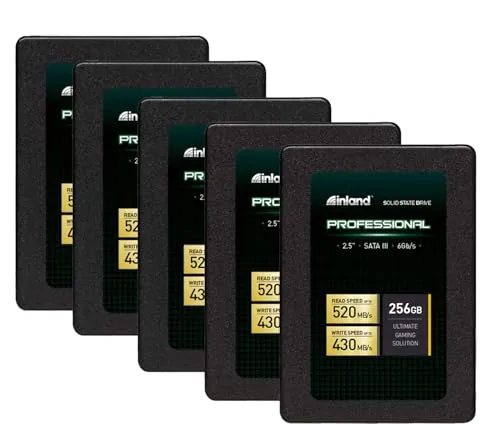
INLAND Professional 256GB SSD 5-Pack
- Five 256GB 2.5-inch SATA SSDs are included for multi-PC upgrades or replacements.
Comparison
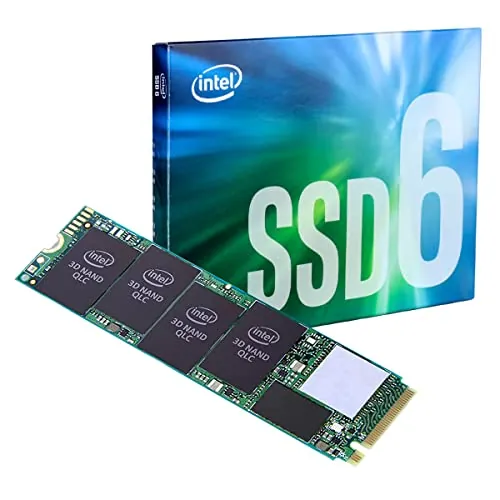
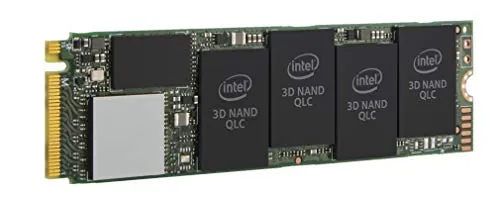
The INLAND Professional 256GB 5-Pack and Intel 660p 1TB solve different storage needs. Intel is the stronger single-drive option for compatible M.2 NVMe systems, with 1TB capacity and far higher quoted sequential speeds, while INLAND is better suited to upgrading several 2.5-inch SATA computers for light everyday use.
#1 Overall Winner
Contender
Choose the Intel 660p 1TB for a compatible M.2 PCIe system needing one spacious, fast everyday or game-storage drive. Choose the INLAND Professional 256GB 5-Pack when several 2.5-inch SATA computers need affordable boot-drive upgrades. Avoid treating either as the first choice for sustained write-heavy workloads.
Overall winner
Depends on your needs
| Feature | INLAND Professional 256GB SSD 5-Pack | Intel 660p Series 1TB NVMe SSD | Winner |
|---|---|---|---|
Overall fit |
77 overall score |
78 overall score |
Intel 660p Series 1TB NVMe SSD |
Form factor |
2.5-inch SATA |
M.2 2280 |
Depends |
Interface |
SATA III 6Gb/s |
PCIe NVMe 3.0 x4 |
Intel 660p Series 1TB NVMe SSD |
Capacity supplied |
Five 256GB drives |
One 1TB drive |
Depends |
Quoted sequential read |
Up to 520MB/s |
Up to 1,800MB/s |
Intel 660p Series 1TB NVMe SSD |
Quoted sequential write |
Up to 430MB/s |
Up to 1,800MB/s |
Intel 660p Series 1TB NVMe SSD |
NAND type |
TLC 3D NAND |
QLC 3D NAND |
Depends |
Setup |
84 setup score |
86 setup score |
Intel 660p Series 1TB NVMe SSD |
Compatibility |
70 compatibility score |
83 compatibility score |
Intel 660p Series 1TB NVMe SSD |
Reliability feedback |
72 reliability score |
69 reliability score |
INLAND Professional 256GB SSD 5-Pack |
Value |
86 value score |
87 value score |
Intel 660p Series 1TB NVMe SSD |
Warranty information |
Three-year limited parts and labor |
Term not provided |
INLAND Professional 256GB SSD 5-Pack |
For compatible systems, the Intel 660p has the stronger peak-performance proposition. It quotes up to 1,800MB/s sequential reads and writes, compared with INLAND's up to 520MB/s reads and 430MB/s writes. This makes Intel better suited to faster loading and transfers that remain within its cache behaviour.
However, the comparison is not solely about maximum numbers. Intel reviews repeatedly caution that large, sustained writes can slow sharply once the SLC cache is exhausted. INLAND's SATA performance is lower but aligns with basic boot-drive, application, and light-use upgrades. Neither drive is best represented as a sustained-write workstation SSD.
Intel's higher interface bandwidth and quoted 1,800MB/s read and write figures give it the speed advantage over INLAND's quoted 520MB/s read and 430MB/s write figures. It is the stronger choice for users who can benefit from NVMe transfers and loading behaviour.
Actual speed depends on system configuration, available PCIe bandwidth, and workload. Intel review feedback shows that heavy sustained writes may fall well below its initial burst speed after the cache fills. INLAND is slower by design but still represents a meaningful speed upgrade from a hard disk for basic everyday work.
Neither product has consistently clean reliability feedback. INLAND has the higher reliability result and some long-term positive reports, but its reviews also mention drives failing within months, freezes, and Windows recognition problems. Intel has mixed reports too, including concerns around QLC endurance and longevity.
The workload matters. Intel's QLC design is repeatedly described as more suitable for read-focused and ordinary use than heavy writing. INLAND is also not recommended in the supplied feedback for heavy write-intensive tasks. Keep current backups regardless of which drive is chosen.
Both products score well for everyday usability because SSD upgrades can make booting and application loading more responsive than a mechanical drive. INLAND's 2.5-inch SATA format is familiar for many older laptop and desktop upgrades. Intel reviews describe a simple insert-and-secure installation followed by Windows initialisation.
Intel is marginally ahead for setup, but physical compatibility determines which is easier in practice. An M.2 PCIe slot is mandatory for the 660p; a 2.5-inch SATA bay and SATA connection are required for INLAND. INLAND also has more mixed recognition feedback, which may add troubleshooting in some systems.
The products are designed for different internal layouts. INLAND's 2.5-inch form factor is appropriate for PCs and laptops with SATA drive bays, whereas Intel's M.2 2280 board mounts directly into a compatible M.2 slot and uses less physical space. Intel has the higher design result because its compact format suits modern systems well.
That does not mean M.2 is universally preferable. For older computers with a spare 2.5-inch bay, the INLAND design is the directly compatible and more practical option. Choose based on the machine rather than form factor alone.
Intel has the stronger build-quality result. Its M.2 stick format is compact and designed for direct motherboard installation, while INLAND is a conventional 2.5-inch SATA enclosure. The supplied data does not support a detailed materials comparison beyond INLAND's stated 3D NAND flash enclosure material.
INLAND's shock-resistant solid-state design is beneficial for moved systems. Still, its lower build-quality score and some review comments about a lightweight feel make Intel the modest winner in this category. This does not replace the need for backups, as both products receive mixed reliability feedback.
INLAND has a higher durability result and uses TLC 3D NAND, with shock resistance stated in the listing. Intel's QLC NAND enables capacity and value, but supplied reviews raise lower-endurance concerns and advise against high-write workloads. Intel also receives some reports of heat, although other users report acceptable temperatures.
For routine, moderate use, either can be workable. For a purchase focused specifically on sustained writes or maximum endurance, the available data does not make either one a clear specialist choice. INLAND has the narrow advantage here, while Intel's suitability is strongest in read-oriented storage.
Intel's M.2 2280 form factor is physically smaller and lighter than a 2.5-inch drive, which can matter in compact devices. However, portability is not a primary differentiator for internal storage, and no portability score is provided for the Intel. INLAND's shock-resistant design is useful where installed systems are moved.
INLAND's distinguishing feature is its five-drive bundle: it supports several separate upgrades and uses the common 2.5-inch SATA format. It also lists shock resistance, silent operation, and a three-year limited parts-and-labor warranty. Intel's main feature advantage is its M.2 NVMe interface and 1TB capacity in one compact drive.
Both are conventional internal SSDs rather than smart or app-dependent products. The practical feature choice is therefore between INLAND's multi-system SATA deployment and Intel's faster, higher-capacity NVMe storage for one compatible device.
Neither SSD has a core companion-app experience described in the supplied listing data. Some Intel reviews mention Intel SSD Toolbox for monitoring or cache-related maintenance, but this is review-specific feedback rather than a stated product requirement. No comparable INLAND application information is provided.
Intel has a narrow setup advantage, with reviews describing installation as inserting the M.2 drive, securing it, and initialising or formatting it in Windows. INLAND also scores strongly for setup and is frequently praised as an easy SATA replacement drive.
The simplest installation depends on the machine. Installing INLAND generally means connecting a 2.5-inch SATA drive, while Intel requires the correct M.2 2280 PCIe slot and mounting screw. Neither comparison should proceed without first checking the computer's storage interface.
Intel scores higher for compatibility and is described as working with a wide range of notebooks, desktops, and mobile devices that accept M.2 2280 PCIe drives. Reviews also show successful use in some older systems with adapters, but adapters and specific platform support are outside the basic installation path.
INLAND is compatible with desktop and laptop SATA environments, but the supplied customer overview includes mixed compatibility feedback and Windows 10 detection issues. The key point is not the score alone: the two products use different interfaces. Verify the exact drive bay or M.2 slot before selecting either one.
Intel wins connectivity because PCIe NVMe 3.0 x4 provides substantially more bandwidth than SATA III 6Gb/s, reflected in its higher connectivity result and quoted performance. The trade-off is stricter host requirements: the system needs an M.2 2280 PCIe/NVMe slot.
INLAND's SATA connection is slower but remains broadly useful in desktops and laptops built around 2.5-inch SATA storage. It is the better connectivity choice only where the computer has SATA support but lacks a suitable NVMe slot. Check slot type and lane support before buying the Intel.
INLAND has a slightly stronger power-efficiency result and is described as producing no noise and no overheating in its listing. Some reviews also report acceptable power behaviour. Intel's efficiency result remains solid, but customer feedback is mixed on thermals, with some users saying it runs hot under load.
Neither product has detailed power-consumption figures in the supplied data, so a precise consumption comparison is not possible. System configuration, workload, and cooling will influence real-world results.
Both drives score very well for value, with Intel narrowly ahead. Intel offers 1TB capacity, NVMe connectivity, and higher quoted sequential speeds in a single drive, making it a strong value option for compatible systems and read-oriented storage such as games. Its QLC limitations mean that maximum value depends on avoiding frequent sustained heavy writes.
INLAND's value is different rather than weaker: five drives can be highly cost-effective for upgrading multiple SATA-equipped computers. It is a sensible value choice for light-to-moderate use, but lower capacity per drive, slower SATA performance, and mixed compatibility feedback should be weighed against the bundle convenience.
Intel has the stronger brand-trust result in the supplied scoring. INLAND's listing and reviews still provide meaningful buyer confidence through a high review count, positive value feedback, and a stated three-year limited warranty. However, the INLAND score is held back by mixed reports around early failures and recognition issues.
Brand trust should not override the technical fit. Intel is only useful if the system supports its M.2 PCIe interface, while INLAND is the relevant option for 2.5-inch SATA upgrades. Backups remain more important than brand preference for protecting data.
Intel leads customer satisfaction, supported by a 4.8/5 rating from 2,737 reviews and frequent praise for storage capacity, price-to-performance, fast loading, and installation ease. Buyers also note meaningful limitations around heat, QLC endurance, and sustained write performance.
INLAND remains well received, with a 4.6/5 rating from 4,669 reviews. Feedback often praises its low-cost boot-drive role, installation, startup improvement, and SATA read speed. Its satisfaction picture is moderated by reports of early failures, freezes, and Windows recognition problems.
INLAND has the clearer warranty position in the provided data: a three-year limited parts-and-labor warranty is stated. Intel's listing mentions warranty as included media but does not provide a duration or terms. This is reflected in INLAND's stronger warranty-support result.
Buyers should confirm current coverage, seller terms, and return procedures before purchase, especially because both products have mixed reliability feedback in reviews. The supplied data does not provide enough detail to compare claim handling or replacement experiences.
The Intel 660p Series 1TB is the best overall option in this comparison for a compatible modern PC. It has the narrow overall-score lead, 1TB of storage in one compact drive, higher quoted NVMe speeds, and stronger results for compatibility, setup, value, brand trust, and customer satisfaction. It is especially persuasive for game libraries and general read-oriented storage.
The INLAND Professional 256GB 5-Pack remains the better purchase for a different job: upgrading several SATA-equipped systems without needing an M.2 slot. It offers practical everyday responsiveness, TLC NAND, and clearer supplied warranty information. Neither is an ideal pick for frequent sustained heavy writes, and both have mixed reliability feedback. Select Intel for one compatible NVMe system and INLAND for multiple light-duty SATA upgrades, then verify fit and maintain backups.
Overall winner
Depends on your needs
The Intel 660p has the slightly higher overall result and is the stronger single-drive choice when your system supports M.2 PCIe NVMe. It combines 1TB capacity with much higher quoted sequential speeds. The INLAND bundle is more appropriate when several 2.5-inch SATA systems need affordable, light-duty upgrades.
Yes, on a compatible PCIe NVMe connection. Intel quotes up to 1,800MB/s for sequential reads and writes, while INLAND quotes up to 520MB/s read and 430MB/s write. Actual results depend on the host system, and the Intel's sustained writes may slow substantially after its SLC cache is filled.
No. The INLAND is a 2.5-inch SATA drive, whereas the Intel is an M.2 2280 PCIe/NVMe drive. A laptop must have the correct M.2 PCIe slot for the Intel. Buyers replacing an existing 2.5-inch SATA drive should verify whether their computer also supports NVMe before choosing the Intel.
The Intel 660p is generally the better fit for gaming storage in a compatible system because it provides 1TB in one drive and has much higher quoted NVMe throughput. Reviews specifically describe it as suitable for game libraries and read-focused storage. It is less appropriate for frequent, very large sustained writes.
The INLAND Professional 5-Pack is the more practical choice for several older desktops or laptops with 2.5-inch SATA bays. It provides five separate 256GB drives and is reviewed positively as a low-cost boot-drive upgrade. Confirm SATA compatibility, as some feedback mentions Windows recognition problems.
Neither is the clearest match for sustained, write-heavy editing work based on the supplied feedback. INLAND reviews caution against write-intensive use, while Intel 660p reviews note that QLC performance can drop sharply after the cache is exhausted. Buyers with frequent large writes should consider a drive designed for that workload.
Both score well for setup, but the right answer depends on the computer. The INLAND uses the familiar 2.5-inch SATA format, while the Intel installs into a compatible M.2 2280 slot. Intel reviews describe insertion, securing the drive, and Windows initialisation as straightforward, but slot compatibility remains essential.
Neither has an unqualified reliability advantage in the supplied data. INLAND has a somewhat higher reliability score and a listed three-year limited warranty, but reviews include early failures, freezes, and recognition issues. Intel reviews also report mixed long-term reliability, heat concerns, and QLC endurance limitations. Maintain backups with either option.
Check our rankings and expert guides to find the best electronics products for your goals.