ElectronicsRanker
Menu
G-Technology ArmorATD 5TB vs INLAND Professional 1TB SSD

Comparison

G-Technology ArmorATD 5TB vs INLAND Professional 1TB SSD

The G-Technology ArmorATD 5TB and INLAND Professional 1TB SATA SSD solve different storage problems: one is a rugged, high-capacity portable external hard drive, while the other is a speed-oriented internal SATA upgrade. The INLAND scores higher overall for compatible PC and laptop upgrades, whereas the ArmorATD is the more appropriate choice for carrying large files with specified external protection.

Expert tested Data driven Unbiased reviews Updated 2 August 2026
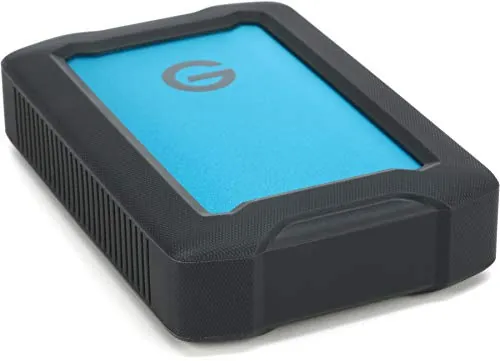
G-Technology 5TB ArmorATD All-Terrain Rugged Portable External Hard Drive

#1 Overall Winner

G-Technology 5TB ArmorATD All-Terrain Rugged Portable External Hard Drive

72/100
  • 5TB capacity provides substantially more room for large photo, video, backup, and media libraries.
View review
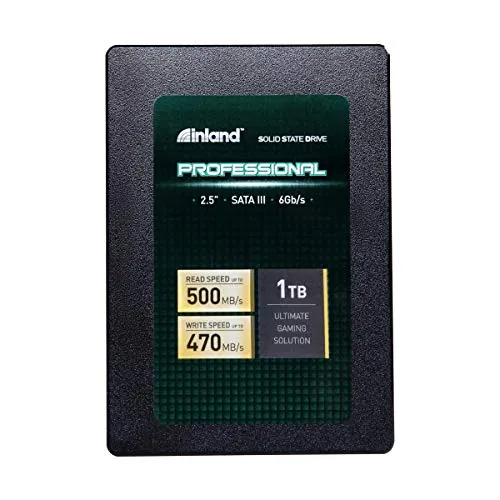
INLAND Professional 1TB SATA SSD

Contender

INLAND Professional 1TB SATA SSD

76/100
  • Stated sequential speeds up to 500MB/s read and 470MB/s write support a much faster everyday upgrade than a mechanical hard drive.
View review

Quick verdict

Choose the INLAND Professional 1TB SATA SSD for a compatible internal laptop or desktop upgrade where faster everyday operation matters most. Choose the G-Technology ArmorATD 5TB when you need much more portable storage and a rugged USB enclosure for travel or field use.

Overall winner

Depends on your needs

At-a-glance comparison

Feature G-Technology 5TB ArmorATD All-Terrain Rugged Portable External Hard Drive INLAND Professional 1TB SATA SSD Winner

Product type

Portable external mechanical hard drive

Internal 2.5-inch SATA solid-state drive

Depends

Capacity

5TB

1TB

G-Technology 5TB ArmorATD All-Terrain Rugged Portable External Hard Drive

Everyday performance

Mechanical drive; mixed speed feedback

Up to 500MB/s read and 470MB/s write

INLAND Professional 1TB SATA SSD

Connection

USB 3.1 / USB-C ready

SATA III 6Gb/s

Depends

Rugged protection

IP54, triple-layer shock resistance, 1,000-pound crush rating

Shock-resistant flash storage

G-Technology 5TB ArmorATD All-Terrain Rugged Portable External Hard Drive

Installation role

External drive

Internal drive

Depends

Setup score

Lower; some formatting feedback

Higher; reviews often note easy installation

INLAND Professional 1TB SATA SSD

Portability

Portable external unit

Small internal component

G-Technology 5TB ArmorATD All-Terrain Rugged Portable External Hard Drive

Power efficiency

Lower score

Higher score; no moving parts

INLAND Professional 1TB SATA SSD

Reliability feedback

Failure and cable complaints reported

Some early-failure complaints reported

INLAND Professional 1TB SATA SSD

Overall score

72

76

INLAND Professional 1TB SATA SSD

Detailed comparison

Performance

The INLAND has the performance advantage for a compatible internal system. It lists sequential read/write speeds up to 500MB/s and 470MB/s, and review feedback associates it with faster startup and improved day-to-day responsiveness. The ArmorATD's performance focus is capacity and portable access rather than SSD-like responsiveness; review feedback on transfer speed is mixed. For OS, applications, and routine internal storage, the INLAND is the more suitable performer. For moving or storing large volumes externally, the ArmorATD's 5TB capacity is its practical advantage.

Speed

The INLAND wins on speed. Its specified sequential performance reaches up to 500MB/s read and 470MB/s write, and it has the higher speed score. The ArmorATD is a mechanical drive with a listed 130 megabits-per-second data transfer rate and mixed review feedback on real-world transfers. The ArmorATD may be sufficient for bulk storage, but the INLAND is the better option for operating-system duties and faster everyday access.

Reliability

Both products require cautious expectations and a backup plan. The ArmorATD has the lower reliability score, with aggregated feedback citing spontaneous failures, drives not being recognized, and cable-related disconnections. The INLAND's reliability score is higher, and some reviews describe extended satisfactory use, but other reports mention failures within months and quality-control concerns. The INLAND has the comparative edge, but neither review profile supports relying on a single drive for irreplaceable files.

G-Technology 5TB ArmorATD All-Terrain Rugged Portable External Hard Drive

Pros

  • 5TB capacity provides substantially more room for large photo, video, backup, and media libraries.
  • Rugged triple-layer protection, an IP54 rain-and-dust-resistant enclosure, and a stated 1,000-pound crush rating.
  • Portable 2.5-inch external design with USB-C readiness and USB 3.0 and Thunderbolt 3 compatibility.
  • Works with Mac and Windows, with review feedback noting cross-platform use after partitioning.
  • Strong build-quality and portability scores, supported by many reviews describing the enclosure as sturdy.
  • High customer rating from a substantial review base.

Cons

  • It is a mechanical hard drive, so it is not the speed-focused choice for system-drive duties.
  • Transfer-speed feedback is mixed, and its speed score is comparatively low.
  • Some buyers report that the drive was not recognized or that Mac formatting and access were inconvenient.
  • Reviews include reports of loose cable connections, unexpected ejection, and spontaneous drive failures.
  • The 5TB version has stated shock resistance up to 1m on a carpeted concrete floor, rather than 1.2m for the 1TB and 2TB versions.
  • Its larger-capacity mechanical design is heavier than an internal SSD.
G-Technology 5TB ArmorATD All-Terrain Rugged Portable External Hard Drive

INLAND Professional 1TB SATA SSD

Pros

  • Stated sequential speeds up to 500MB/s read and 470MB/s write support a much faster everyday upgrade than a mechanical hard drive.
  • Designed as a 2.5-inch SATA internal drive for desktop, laptop, and ultrabook upgrades.
  • Easy-installation and boot-drive feedback is a recurring positive in the provided review summary.
  • 3D TLC NAND, shock resistance, silent operation, and no moving parts.
  • Stated endurance of up to 660TBW and a three-year limited parts and labor warranty.
  • Stronger overall, performance, usability, speed, setup, power-efficiency, and value scores.

Cons

  • 1TB capacity is far lower than the ArmorATD's 5TB capacity.
  • It is an internal SATA drive, so it requires a compatible 2.5-inch SATA bay or connection and is not a ready-to-use portable external drive.
  • Review feedback indicates mixed compatibility, including reports that Windows 10 did not recognize some drives.
  • Some buyers report early failures or quality-control concerns.
  • Provided reviews characterize it as less suitable for write-intensive work such as a video-editing scratch drive.
  • It lacks the ArmorATD's stated IP54 enclosure and crush-resistant external protection.
INLAND Professional 1TB SATA SSD

Final verdict

The INLAND Professional 1TB SATA SSD is the better overall-scoring product and the more compelling choice for a compatible internal PC or laptop upgrade. Its stronger performance, speed, usability, setup, power-efficiency, value, and warranty-support assessments fit users seeking faster booting and everyday responsiveness. Positive reviews also commonly note quick installation and an appreciable improvement over older hard drives.

The G-Technology ArmorATD 5TB is still the better purchase for a distinctly different job: portable, high-capacity storage with a rugged enclosure. Its 5TB capacity and stated environmental protection are advantages the internal INLAND cannot provide. The decision should not come down to the overall score alone. Choose the INLAND for internal SSD performance; choose the ArmorATD for rugged external bulk storage, and back up critical data with either option.

Overall winner

Depends on your needs

Frequently asked questions

Which is better overall: the G-Technology ArmorATD 5TB or INLAND Professional 1TB SSD?

The INLAND Professional 1TB SSD has the higher overall score and is the stronger choice for a compatible internal system upgrade, everyday responsiveness, and straightforward installation. The ArmorATD is not a direct replacement, however: its advantage is portable 5TB storage with a rugged external enclosure. Choose based on whether you need internal speed or external capacity and protection.

Is the ArmorATD 5TB faster than the INLAND 1TB SATA SSD?

No. The INLAND lists sequential read/write performance up to 500MB/s and 470MB/s, while the ArmorATD is a mechanical external hard drive with mixed speed feedback and a lower speed score. The ArmorATD may be adequate for portable storage and backups, but the INLAND is the better fit when faster booting, application loading, and routine internal-drive performance matter.

Which drive offers more storage capacity?

The G-Technology ArmorATD offers 5TB, compared with 1TB for the INLAND Professional SSD. That makes the ArmorATD more suitable when capacity is the central requirement, such as carrying large photo, video, backup, or media collections. The INLAND's 1TB capacity is more oriented toward an internal operating-system drive or a mainstream personal-computing upgrade.

Can the INLAND Professional SSD be used as a portable external drive?

Not by itself. The INLAND is specified as a 2.5-inch internal SATA SSD and needs compatible SATA hardware or a suitable external enclosure not included in the supplied product data. The ArmorATD is the ready-to-use portable option because it is an external USB drive with USB-C readiness. Check your computer's available connections before choosing.

Which is better for travel and field storage?

The ArmorATD is the clearer travel and field-storage choice. It is a portable external drive with a stated IP54 rain-and-dust-resistant enclosure, triple-layer shock resistance, and a 1,000-pound crush rating. Its 5TB capacity also suits large files. Buyers should still maintain backups, as the review data includes reports of cable, recognition, and failure issues.

Which is better for upgrading an old laptop?

For a laptop with a compatible 2.5-inch SATA connection, the INLAND Professional SSD is the better upgrade path. Reviews highlight easier installation, faster startup, and improved responsiveness relative to older hard drives. Confirm physical bay compatibility and SATA support first. The ArmorATD is external storage and does not serve as an internal replacement drive without a different use case.

Are either of these drives fully reliable for important files?

Neither product should be the only copy of important files. The ArmorATD has reviews reporting spontaneous failures, recognition problems, and cable-related disconnections. The INLAND has some reports of early failure and mixed Windows recognition, despite many positive long-term and installation reports. Use a separate backup strategy regardless of which drive better fits your needs.

Which product is easier to set up?

The INLAND receives the stronger setup score and is commonly described as easy to install, but it requires opening or otherwise accessing a compatible computer's internal SATA connection. The ArmorATD is externally connected and physically convenient, though reviews mention formatting, access, cable, and compatibility friction for some users. The easier option depends on whether your system accepts an internal SATA drive.

Related comparisons

Still not sure which one to choose?

Check our rankings and expert guides to find the best electronics products for your goals.

View all rankings